> ## Documentation Index
> Fetch the complete documentation index at: https://docs.retellai.com/llms.txt
> Use this file to discover all available pages before exploring further.
# Data Storage Settings
> Control how Retell stores sensitive call data — recordings, transcripts, dynamic variables, caller IDs, KB logs — with per-agent privacy settings.
# Data Storage Privacy Settings
By default, we store potentially sensitive data related to your calls, including:
* Call logs
* Transcriptions
* Call recordings
* Caller ID for inbound call
* Callee ID for outbound call
* Knowledge base retrieved contents logs
* Dynamic variables
* Metadata
## How to Manage Data Storage
You can opt out of sensitive data storage at any time:
1. Navigate to your agent
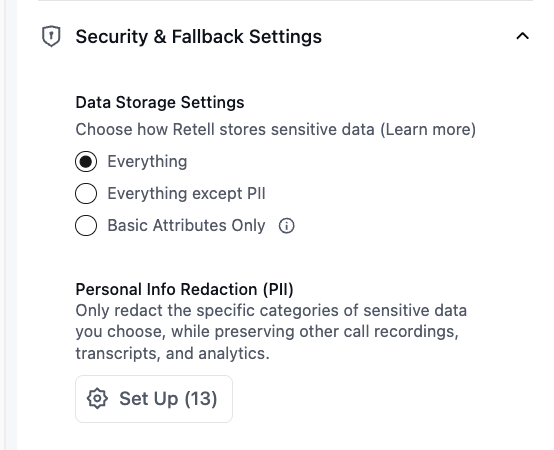
2. Under **Security & Fallback Settings → Data Storage Settings**, select:
* **Everything** — store transcripts, recordings, and logs
* **Everything except PII** — store content, excluding PII when possible
* **Basic Attributes Only** — store only metadata (no transcripts/recordings/logs)
 You can also configure a **data retention period** to automatically delete stored data after a set number of days. See [Data Retention Policy](/accounts/data-retention) for details.
## What Happens When You Change Storage Settings
When you opt out:
* You will continue to receive [webhook events](/features/webhook-overview), where you can access the transcript, call recording, and other sensitive data in it
* The call recording link will expire after 10 minutes upon receiving the webhook
* **Everything**: All artifacts (transcripts, recordings, logs) are stored
* **Everything except PII**: Artifacts are stored with PII removed according to the categories you select in your `pii_config`. See [PII scrubbing](#pii-scrubbing) below for exactly which fields are affected.
* **Basic Attributes Only**: No transcripts/recordings/logs are stored; if you query the call with the get call API later, you will not get these fields
## PII scrubbing
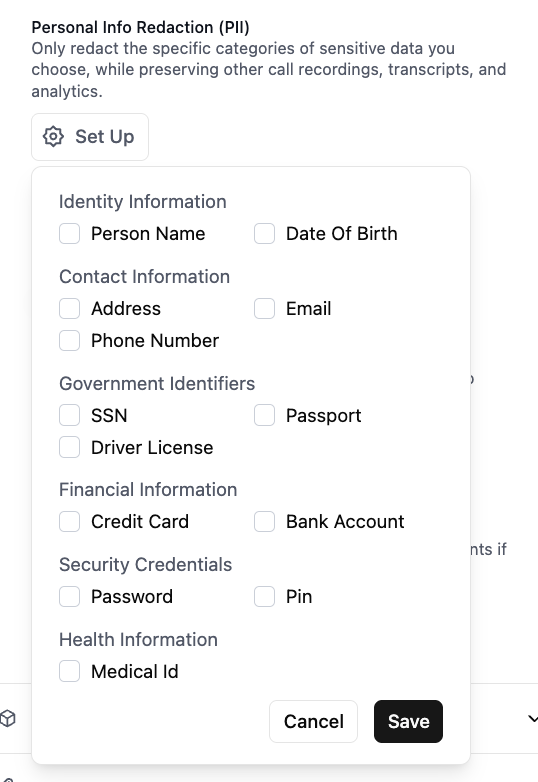
When you choose "Everything except PII", you can configure which personally identifiable information (PII) is removed after the call completes. Scrubbing is applied across the **transcript, recording, public logs, and structured fields on the call record itself** (dynamic variables, metadata, call analysis, tool call arguments and results).
PII configuration is defined on the agent. Per-call storage behavior can still be limited via `data_storage_setting` inherited onto the call.
### Content categories
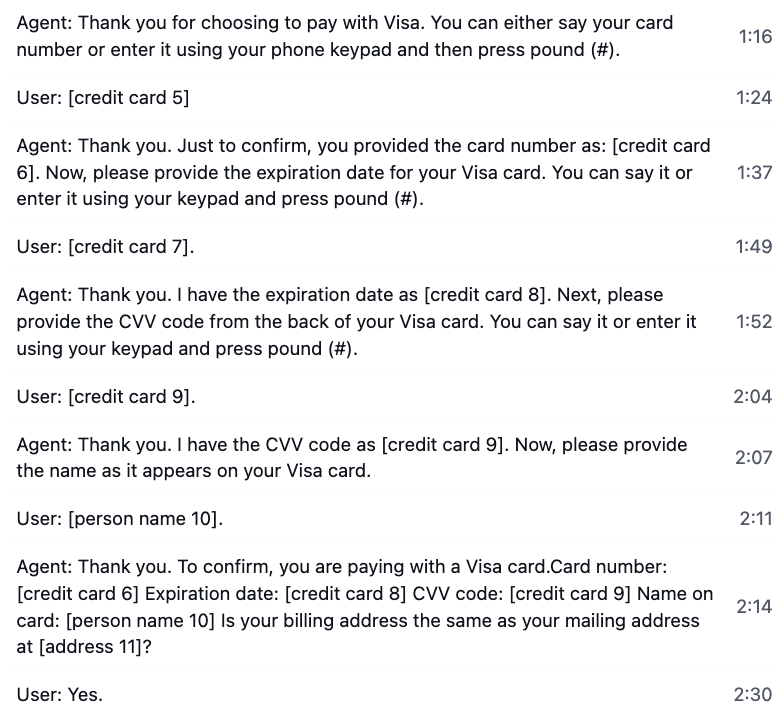
When any of these categories are selected, occurrences are detected post-call and replaced with `[category number]` placeholders (e.g. `[email 1]`, `[person name 2]`):
* `person_name`
* `address`
* `email`
* `ssn`
* `passport`
* `driver_license`
* `credit_card`
* `bank_account`
* `password`
* `pin`
* `medical_id`
* `date_of_birth`
* `customer_account_number`
These placeholders are written into the scrubbed copies of:
* **Transcript** — user and agent utterances
* **Recording** — audio is replaced with a beep over the PII intervals (surfaced as `scrubbed_recording_url`)
* **Public logs** — log file content
* **Dynamic variables** — `retell_llm_dynamic_variables`, collected dynamic variables, and override dynamic variables (surfaced as their `scrubbed_*` counterparts)
* **Metadata** — `metadata` (surfaced as `scrubbed_metadata`)
* **Call analysis** — `call_analysis.call_summary` and `call_analysis.custom_analysis_data` (surfaced as `scrubbed_call_analysis`)
* **Tool calls** — arguments and results
* **DTMF digits** — replaced with `[PII INFO]` whenever any PII category is enabled, to avoid exposing touch-tone passwords or PINs
* **SMS message text** (for chat agents)
The raw originals are deleted under "Everything except PII" — only the scrubbed versions remain.
### `phone_number` (directional)
`phone_number` behaves differently from the content categories. Selecting it redacts the **customer's** phone number from the call record itself, not just the transcript:
* **Inbound calls**: `from_number` is removed
* **Outbound calls**: `to_number` is removed
* **SMS chats**: `user_number` is removed
The opposite-direction number (your Retell number) is preserved. The field is removed entirely from the call object — there is no placeholder. If you need to keep the customer's number visible for downstream systems, do not include `phone_number` in your categories.
### What is always preserved
Regardless of the categories you configure, these fields are never altered or removed by PII scrubbing:
* **Identifiers**: `call_id`, `agent_id`
* **Timing**: `start_timestamp`, `end_timestamp`, `duration_ms`
* **Outcome**: `call_status`, `disconnection_reason`, `call_successful`, `user_sentiment`, `in_voicemail`
* **Operational**: `direction`, `transfer_destination`, `call_latency`, `cost_metadata`, `call_cost`, `custom_attributes`
* **Tool call records** — the name, timing, and success of each tool call (their *arguments and results* are still scrubbed when content categories are selected)
To remove these fields as well, use the **Basic Attributes Only** storage setting or configure a [data retention period](/accounts/data-retention).
You can also configure a **data retention period** to automatically delete stored data after a set number of days. See [Data Retention Policy](/accounts/data-retention) for details.
## What Happens When You Change Storage Settings
When you opt out:
* You will continue to receive [webhook events](/features/webhook-overview), where you can access the transcript, call recording, and other sensitive data in it
* The call recording link will expire after 10 minutes upon receiving the webhook
* **Everything**: All artifacts (transcripts, recordings, logs) are stored
* **Everything except PII**: Artifacts are stored with PII removed according to the categories you select in your `pii_config`. See [PII scrubbing](#pii-scrubbing) below for exactly which fields are affected.
* **Basic Attributes Only**: No transcripts/recordings/logs are stored; if you query the call with the get call API later, you will not get these fields
## PII scrubbing
When you choose "Everything except PII", you can configure which personally identifiable information (PII) is removed after the call completes. Scrubbing is applied across the **transcript, recording, public logs, and structured fields on the call record itself** (dynamic variables, metadata, call analysis, tool call arguments and results).
PII configuration is defined on the agent. Per-call storage behavior can still be limited via `data_storage_setting` inherited onto the call.
### Content categories
When any of these categories are selected, occurrences are detected post-call and replaced with `[category number]` placeholders (e.g. `[email 1]`, `[person name 2]`):
* `person_name`
* `address`
* `email`
* `ssn`
* `passport`
* `driver_license`
* `credit_card`
* `bank_account`
* `password`
* `pin`
* `medical_id`
* `date_of_birth`
* `customer_account_number`
These placeholders are written into the scrubbed copies of:
* **Transcript** — user and agent utterances
* **Recording** — audio is replaced with a beep over the PII intervals (surfaced as `scrubbed_recording_url`)
* **Public logs** — log file content
* **Dynamic variables** — `retell_llm_dynamic_variables`, collected dynamic variables, and override dynamic variables (surfaced as their `scrubbed_*` counterparts)
* **Metadata** — `metadata` (surfaced as `scrubbed_metadata`)
* **Call analysis** — `call_analysis.call_summary` and `call_analysis.custom_analysis_data` (surfaced as `scrubbed_call_analysis`)
* **Tool calls** — arguments and results
* **DTMF digits** — replaced with `[PII INFO]` whenever any PII category is enabled, to avoid exposing touch-tone passwords or PINs
* **SMS message text** (for chat agents)
The raw originals are deleted under "Everything except PII" — only the scrubbed versions remain.
### `phone_number` (directional)
`phone_number` behaves differently from the content categories. Selecting it redacts the **customer's** phone number from the call record itself, not just the transcript:
* **Inbound calls**: `from_number` is removed
* **Outbound calls**: `to_number` is removed
* **SMS chats**: `user_number` is removed
The opposite-direction number (your Retell number) is preserved. The field is removed entirely from the call object — there is no placeholder. If you need to keep the customer's number visible for downstream systems, do not include `phone_number` in your categories.
### What is always preserved
Regardless of the categories you configure, these fields are never altered or removed by PII scrubbing:
* **Identifiers**: `call_id`, `agent_id`
* **Timing**: `start_timestamp`, `end_timestamp`, `duration_ms`
* **Outcome**: `call_status`, `disconnection_reason`, `call_successful`, `user_sentiment`, `in_voicemail`
* **Operational**: `direction`, `transfer_destination`, `call_latency`, `cost_metadata`, `call_cost`, `custom_attributes`
* **Tool call records** — the name, timing, and success of each tool call (their *arguments and results* are still scrubbed when content categories are selected)
To remove these fields as well, use the **Basic Attributes Only** storage setting or configure a [data retention period](/accounts/data-retention).
 ## Announce a recording disclaimer
Retell does not have a dedicated setting for playing a "this call may be recorded" announcement, but you can have the agent say it as its first utterance. Recording, when enabled, runs for the entire call, so the disclaimer itself is captured in the recording.
* **Single or multi-prompt agents** — put the disclaimer text in the agent's **Begin Message** (for example, `"This call may be recorded for quality assurance."`) so it is spoken before any user turn.
* **Conversation flow agents** — add a conversation node at the start of the flow with the disclaimer as its static text, enable **Skip Response** so the agent moves on without waiting for a user reply, and enable **Block Interruptions** so the user can't cut it off. See [Conversation Node](/build/conversation-flow/conversation-node).
If you don't want the disclaimer stored, switch that agent's storage to **Basic Attributes Only** — no recording is retained, but the agent still speaks the announcement live.
## Announce a recording disclaimer
Retell does not have a dedicated setting for playing a "this call may be recorded" announcement, but you can have the agent say it as its first utterance. Recording, when enabled, runs for the entire call, so the disclaimer itself is captured in the recording.
* **Single or multi-prompt agents** — put the disclaimer text in the agent's **Begin Message** (for example, `"This call may be recorded for quality assurance."`) so it is spoken before any user turn.
* **Conversation flow agents** — add a conversation node at the start of the flow with the disclaimer as its static text, enable **Skip Response** so the agent moves on without waiting for a user reply, and enable **Block Interruptions** so the user can't cut it off. See [Conversation Node](/build/conversation-flow/conversation-node).
If you don't want the disclaimer stored, switch that agent's storage to **Basic Attributes Only** — no recording is retained, but the agent still speaks the announcement live.