> ## Documentation Index
> Fetch the complete documentation index at: https://docs.retellai.com/llms.txt
> Use this file to discover all available pages before exploring further.
# Define resolution criteria
> Define resolution criteria for an AI QA cohort using AI-evaluated conditions and performance metric thresholds to decide whether each call counts as successful.
Resolution criteria decide whether each call in your cohort counts as successful. This is the second step of the Create QA flow, after you [define the cohort](/ai-qa/create-cohort).
 ## What determines a successful call?
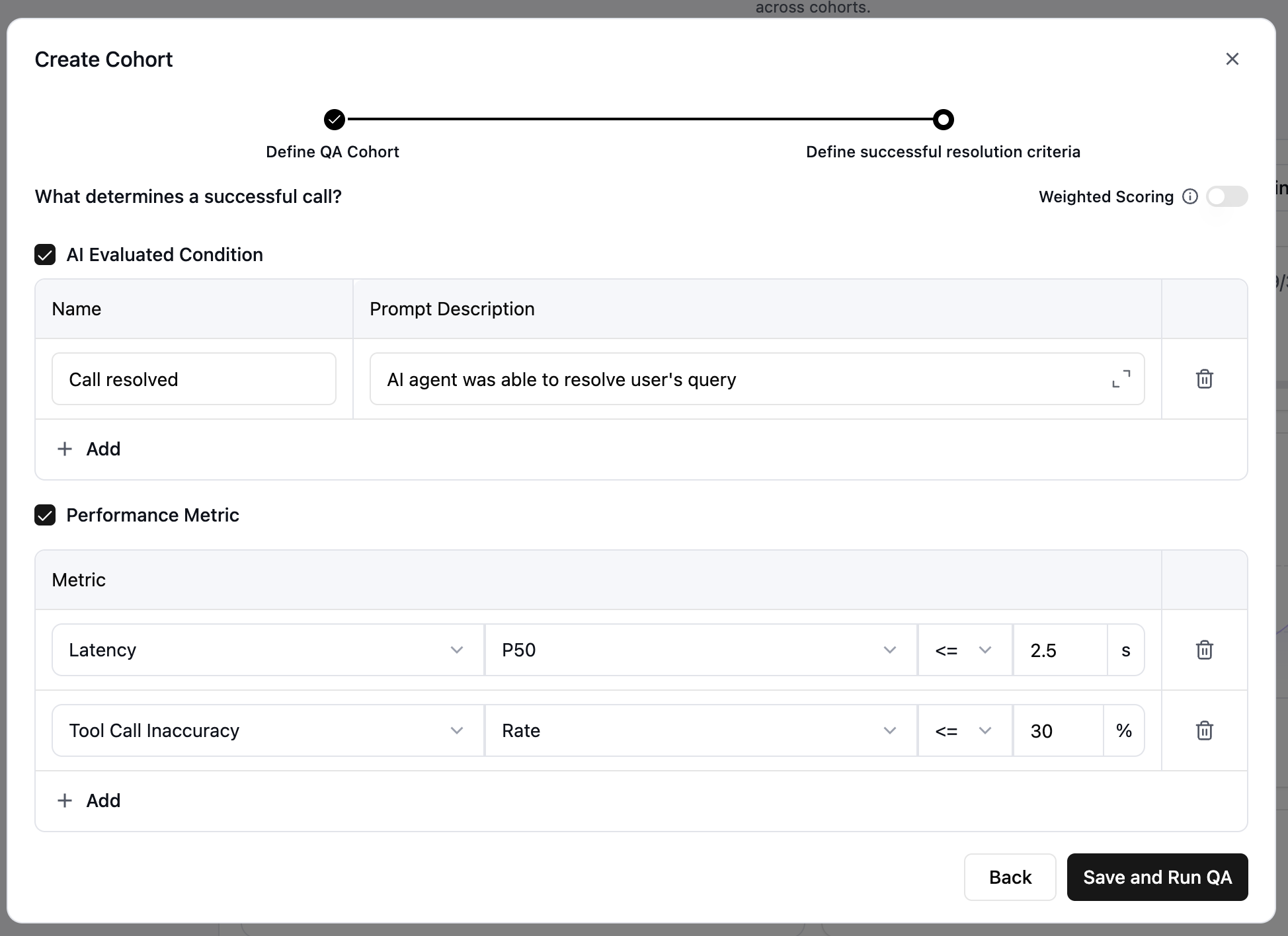
You define this using two kinds of criteria: **AI-evaluated conditions** and **performance metrics**. By default, a call counts as successful only when it meets every condition and every metric. Enable weighted scoring to change how these criteria combine.
An AI-evaluated condition is a qualitative check the AI runs against each call's transcript and context.
* **Name** — A short identifier, such as `Call resolved`, `Customer satisfied`, or `Issue escalated properly`.
* **Prompt description** — The prompt the AI uses to judge whether the condition is met, for example `AI agent was able to resolve the user's query`.
Write prompts that are specific about what success looks like, include context about the call type, and use clear, unambiguous language. Click **+ Add** to add more conditions — each is evaluated independently.
A performance metric is a quantitative threshold a call must meet. Select a metric and set its threshold:
* **Latency** — End-to-end delay between the user speaking and the agent responding.
* **User sentiment** — The caller's emotional state, inferred from speech content, tone, and pitch.
* **Agent sentiment** — The emotional tone of the agent's speech.
* **Overlapping speech** — Count of times the user and agent spoke at once.
* **Transcription** — Word error rate (WER) and count of mistranscribed entities.
* **Agent hallucination** — How often the agent hallucinated.
* **Tool call inaccuracy** — Rate at which the agent invoked the wrong tools.
* **Node transition inaccuracy** — Rate of incorrect node transitions.
* **Agent naturalness** — How human-like the agent sounded across pronunciation, intonation, pacing, and turn-taking.
For full definitions, see [AI QA metrics](/ai-qa/terminologies). Click **+ Add** to add more metrics.
## What determines a successful call?
You define this using two kinds of criteria: **AI-evaluated conditions** and **performance metrics**. By default, a call counts as successful only when it meets every condition and every metric. Enable weighted scoring to change how these criteria combine.
An AI-evaluated condition is a qualitative check the AI runs against each call's transcript and context.
* **Name** — A short identifier, such as `Call resolved`, `Customer satisfied`, or `Issue escalated properly`.
* **Prompt description** — The prompt the AI uses to judge whether the condition is met, for example `AI agent was able to resolve the user's query`.
Write prompts that are specific about what success looks like, include context about the call type, and use clear, unambiguous language. Click **+ Add** to add more conditions — each is evaluated independently.
A performance metric is a quantitative threshold a call must meet. Select a metric and set its threshold:
* **Latency** — End-to-end delay between the user speaking and the agent responding.
* **User sentiment** — The caller's emotional state, inferred from speech content, tone, and pitch.
* **Agent sentiment** — The emotional tone of the agent's speech.
* **Overlapping speech** — Count of times the user and agent spoke at once.
* **Transcription** — Word error rate (WER) and count of mistranscribed entities.
* **Agent hallucination** — How often the agent hallucinated.
* **Tool call inaccuracy** — Rate at which the agent invoked the wrong tools.
* **Node transition inaccuracy** — Rate of incorrect node transitions.
* **Agent naturalness** — How human-like the agent sounded across pronunciation, intonation, pacing, and turn-taking.
For full definitions, see [AI QA metrics](/ai-qa/terminologies). Click **+ Add** to add more metrics.
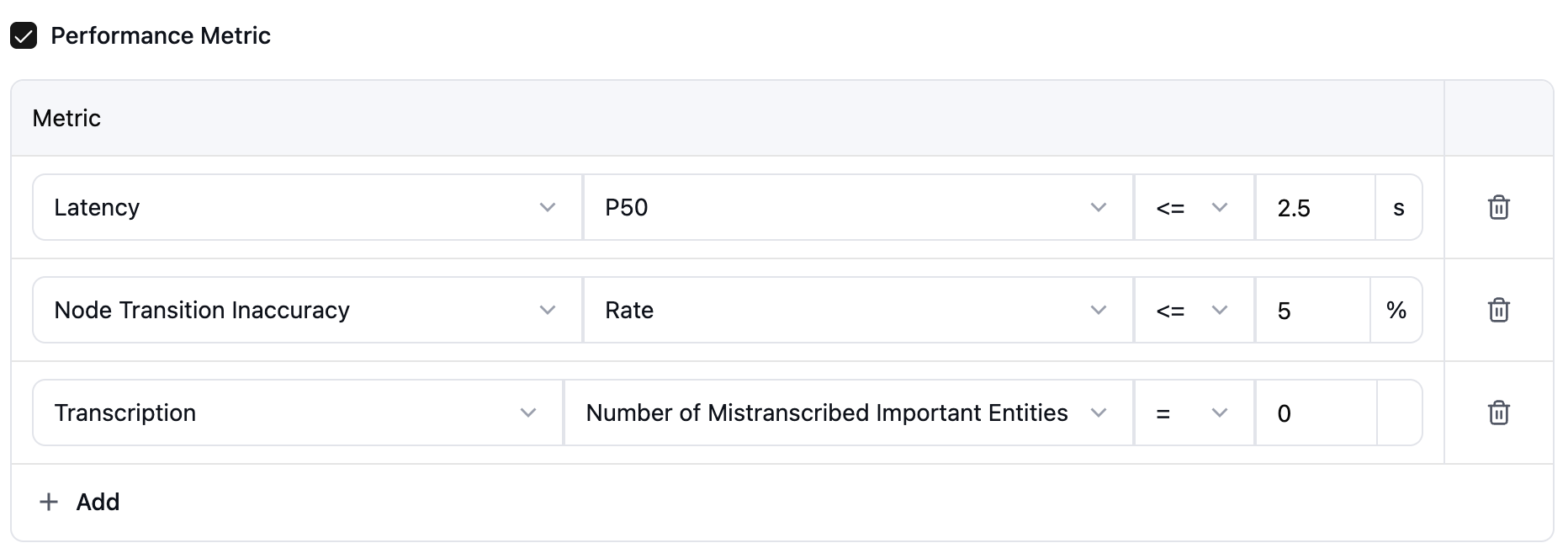 Both AI-evaluated conditions and performance metrics are evaluated. Without weighted scoring, a call is successful only if it meets every condition and every metric.
By default, every condition and metric is required equally, so a call passes only if it meets all of them. Turn on **Weighted scoring** to prioritize some criteria over others instead.
When enabled, assign a weight to each condition and metric, then set the success threshold the weighted total must reach.
Both AI-evaluated conditions and performance metrics are evaluated. Without weighted scoring, a call is successful only if it meets every condition and every metric.
By default, every condition and metric is required equally, so a call passes only if it meets all of them. Turn on **Weighted scoring** to prioritize some criteria over others instead.
When enabled, assign a weight to each condition and metric, then set the success threshold the weighted total must reach.
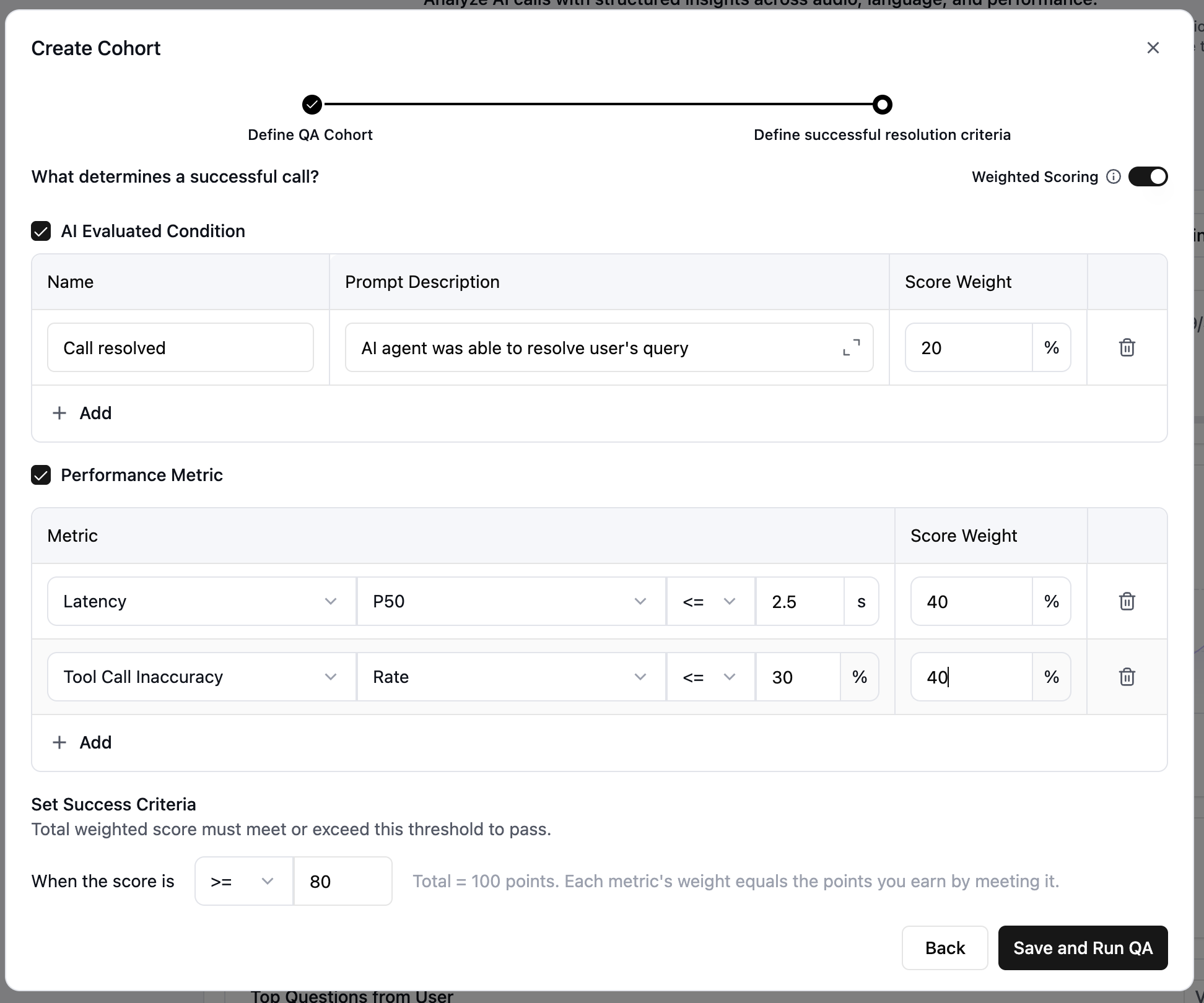 Use weighted scoring when some criteria matter more than others. For example, weight `Call resolved` higher than `Customer satisfied` if resolution is your primary goal.
Click **Save and Run QA** to start analysis. Once it finishes, review the output in [View QA results](/ai-qa/view-qa-results).
If saving fails, check that every required field is filled and every threshold is set, then resolve any validation messages before retrying.
Use weighted scoring when some criteria matter more than others. For example, weight `Call resolved` higher than `Customer satisfied` if resolution is your primary goal.
Click **Save and Run QA** to start analysis. Once it finishes, review the output in [View QA results](/ai-qa/view-qa-results).
If saving fails, check that every required field is filled and every threshold is set, then resolve any validation messages before retrying.