> ## Documentation Index
> Fetch the complete documentation index at: https://docs.retellai.com/llms.txt
> Use this file to discover all available pages before exploring further.
# Code node: run JavaScript in a conversation flow
> Add a Code node to a Retell conversation flow to run JavaScript, read dynamic variables and metadata, call HTTP APIs, and store results.
A Code node runs JavaScript when a conversation flow enters the node. Use it
for calculations, data formatting, and lightweight HTTP lookups that don't
require your own server. The code can read dynamic variables and call metadata,
then store fields from its return value for later nodes.
For example, a Code node can normalize an appointment timestamp, return an
`appointment_label`, and let the flow route based on whether the timestamp was
valid.
If you use a single- or multi-prompt agent, see [Code Tool](/build/single-multi-prompt/code-tool).
 ## When to use a Code node
| | Code node | Custom function |
| --------------------- | --------------------------------------------------- | --------------------------------------------------- |
| **Runs** | JavaScript in Retell's sandbox | An HTTP request to your server |
| **Trigger** | Automatically when the flow enters the node | Automatically when the flow enters a function node |
| **Inputs** | Dynamic variables and call or chat metadata | Parameters, dynamic variables, and request data |
| **Best for** | Formatting, calculations, and low-risk HTTP lookups | Authenticated integrations and production workflows |
| **Maximum code size** | 20,000 characters | Not applicable |
Use a Code node only for logic that can run without secrets. Dynamic variables
and metadata are stored in plaintext with the call or chat record. For
authentication, secret management, internal systems, or production writes, use
a [custom function](/build/conversation-flow/custom-function) hosted on your
backend.
## Configure a Code node
Select **Code** from the action nodes in the left sidebar.
## When to use a Code node
| | Code node | Custom function |
| --------------------- | --------------------------------------------------- | --------------------------------------------------- |
| **Runs** | JavaScript in Retell's sandbox | An HTTP request to your server |
| **Trigger** | Automatically when the flow enters the node | Automatically when the flow enters a function node |
| **Inputs** | Dynamic variables and call or chat metadata | Parameters, dynamic variables, and request data |
| **Best for** | Formatting, calculations, and low-risk HTTP lookups | Authenticated integrations and production workflows |
| **Maximum code size** | 20,000 characters | Not applicable |
Use a Code node only for logic that can run without secrets. Dynamic variables
and metadata are stored in plaintext with the call or chat record. For
authentication, secret management, internal systems, or production writes, use
a [custom function](/build/conversation-flow/custom-function) hosted on your
backend.
## Configure a Code node
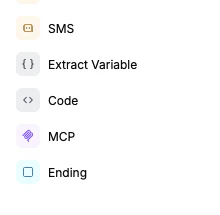
Select **Code** from the action nodes in the left sidebar.
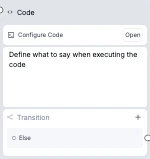
 Select the node, then select **Open** under **Code Configuration**.
Read values from `dv` or `metadata` and return a JSON-serializable value.
Objects are the easiest return type to map into response variables.
```javascript theme={"dark"}
const start = new Date(dv.appointment_start);
if (Number.isNaN(start.getTime())) {
return { valid: false, error: "Invalid appointment_start" };
}
return {
valid: true,
appointment_label: start.toISOString()
};
```
Under **Store Fields as Variables**, map a dynamic-variable name to a path
in the returned value. For the example above, map `appointment_is_valid` to
`valid` and `appointment_label` to `appointment_label`.
See [Store response variables](#store-response-variables) for nested and
array paths.
Set the timeout in the code editor. In the node settings, choose whether the
agent talks or plays a typing sound while the code runs and whether the flow
waits for the result before transitioning.
Use **Dynamic Variables** in the editor to add test values, then select
**Run Code**. The result and any `console.log()` output appear below the
editor.
Test values stay in the dashboard and don't change the live agent. The
dashboard test doesn't populate `metadata`, so metadata-dependent code must
handle an empty object during testing.
## JavaScript environment
The code runs inside a QuickJS sandbox. Top-level `await` is supported.
### `dv`: dynamic variables
Read [dynamic variables](/build/dynamic-variables) as properties of `dv`. All
values in `dv` are strings, including values stored by earlier nodes.
```javascript theme={"dark"}
const customerName = dv.customer_name;
const orderTotal = Number(dv.order_total);
const callerNumber = dv.user_number;
```
Use `dv.user_number`, not `{{user_number}}`, inside JavaScript. Runtime values
such as `call_id`, `chat_id`, `session_type`, `direction`, `user_number`, and
`agent_number` are available when they apply to the current session.
Dynamic variables are available through `dv` inside JavaScript. `{{...}}`
template substitution isn't available inside code.
### `metadata`: call or chat metadata
Read metadata passed when you create the [phone call](/api-references/create-phone-call)
or [chat](/api-references/create-chat).
```javascript theme={"dark"}
const customerId = metadata.customer_id;
const priority = metadata.priority_level;
```
Metadata values can use JSON types. Unlike values in `dv`, they aren't limited
to strings.
### `fetch(url, options)`: HTTP requests
`fetch()` supports HTTP and HTTPS URLs, request methods, string-valued headers,
and request bodies. The returned response supports `status`, `ok`,
`statusText`, `url`, `headers.get()`, `text()`, and `json()`.
```javascript theme={"dark"}
const response = await fetch("https://api.zippopotam.us/us/90210");
if (!response.ok) {
return { found: false, status: response.status };
}
const location = await response.json();
return {
found: true,
city: location.places[0]["place name"],
state: location.places[0]["state abbreviation"]
};
```
The sandbox blocks non-HTTP protocols and selected local, private, and platform
addresses. It doesn't provide the complete browser Fetch API.
Code node `fetch()` requests originate from `35.166.138.221`. If your public
API restricts inbound traffic by IP address, allowlist `35.166.138.221/32`.
### `console.log()`: test output
Use `console.log()` while testing. Logs appear in **Run Code** results. They
aren't added to the live code result or shown as Code node logs in call logs.
```javascript theme={"dark"}
console.log("Customer:", dv.customer_name);
```
### Runtime limits
| Limit | Value |
| ------------------------ | ----------------------------------- |
| Code size | 20,000 characters |
| Timeout | 5–60 seconds; 30 seconds by default |
| Result sent to the agent | 15,000 characters by default |
| Automatic retries | None |
The sandbox provides common JavaScript built-ins such as `Array`, `Date`,
`JSON`, `Map`, `Math`, `Promise`, `RegExp`, and `Set`. Node.js modules, browser
DOM APIs, `require`, `import`, and `Intl` aren't available.
## Store response variables
Response variables copy fields from the full return value into dynamic
variables. For this return value:
```javascript theme={"dark"}
return {
status: "confirmed",
order: {
id: "ord_123",
items: [{ name: "Replacement filter" }]
}
};
```
configure these mappings:
| Dynamic-variable name | Path to value | Stored value |
| --------------------- | --------------------- | -------------------- |
| `order_status` | `status` | `confirmed` |
| `order_id` | `order.id` | `ord_123` |
| `first_item_name` | `order.items[0].name` | `Replacement filter` |
Stored values are strings. Objects and arrays are stored as JSON strings. If a
path doesn't exist or resolves to `null`, Retell skips that variable without
failing the execution.
Response-variable extraction uses the full return value, even when the result
sent to the agent is capped at 15,000 characters.
## Control transition timing
**Wait for Result** is on by default.
* When it is on, Retell waits for the code to finish before evaluating the
node's transition conditions. The return value and stored response variables
are available to those conditions and the next node.
* When it is off, the flow can transition while the code is still running. The
result and stored variables might not be available to the next node.
If **Talk While Waiting** is on, the agent delivers the configured prompt or
static sentence before transitioning. If the caller speaks while the code is
running, the agent can still respond to that turn. Turning **Talk While
Waiting** off suppresses the node's entry message; it doesn't block responses
to caller interruptions.
Use [transition conditions](/build/conversation-flow/transition-condition) that
check stored result fields before the agent confirms an action succeeded.
## Node settings
| Setting | Default | Behavior |
| ------------------------ | ------------ | ----------------------------------------------------------------------------------------------- |
| **Timeout** | 30 seconds | Stops execution after 5–60 seconds. |
| **Talk While Waiting** | Off | Speaks one generated prompt or static sentence when the node starts. |
| **Play typing sound** | Off | Plays a typing sound while Retell waits for the result. Applies when **Wait for Result** is on. |
| **Wait for Result** | On | Waits for the result before transitioning. |
| **Global Node** | Off | Lets other nodes jump to this node without a direct edge. |
| **LLM** | Flow default | Optionally uses a different model for this node's generated speech and transitions. |
| **Fine-tuning Examples** | None | Adds transition examples for this node. |
## Use Code node safely
* Don't put API keys, credentials, or sensitive tokens in code, `dv`, or
`metadata`.
* Use `fetch()` for low-risk HTTP reads. Put authenticated requests and
state-changing operations behind a custom function on your backend.
* For critical routing, provide a safe else path. A timeout, thrown error, or
sandbox failure doesn't retry automatically and doesn't extract response
variables.
## FAQ
No. The sandbox doesn't provide `require`, `import`, Node.js modules, browser DOM APIs, or `Intl`. Use the available JavaScript built-ins and `fetch()`.
Runtime values are available as properties of `dv`, including `dv.call_id`, `dv.user_number`, and `dv.agent_number` when they apply. Use `dv.name` syntax to access them. `{{...}}` template substitution isn't available inside JavaScript.
Retell marks the execution as failed, doesn't extract response variables, and doesn't retry automatically. Use `try/catch` for expected errors and return a structured fallback such as `{ "ok": false, "error": "lookup failed" }`. For critical routing, configure a safe else path.
The setting suppresses the node's entry message. If the caller speaks while the code is running, that user turn can still trigger an agent response before the code result is available. Ground any success confirmation in a stored result field instead of conversation context alone.
Yes. Top-level `await` is supported, including for `fetch()` calls.
Retell sends up to 15,000 characters to the agent by default. Response-variable extraction uses the full return value before that result is capped.
Select the node, then select **Open** under **Code Configuration**.
Read values from `dv` or `metadata` and return a JSON-serializable value.
Objects are the easiest return type to map into response variables.
```javascript theme={"dark"}
const start = new Date(dv.appointment_start);
if (Number.isNaN(start.getTime())) {
return { valid: false, error: "Invalid appointment_start" };
}
return {
valid: true,
appointment_label: start.toISOString()
};
```
Under **Store Fields as Variables**, map a dynamic-variable name to a path
in the returned value. For the example above, map `appointment_is_valid` to
`valid` and `appointment_label` to `appointment_label`.
See [Store response variables](#store-response-variables) for nested and
array paths.
Set the timeout in the code editor. In the node settings, choose whether the
agent talks or plays a typing sound while the code runs and whether the flow
waits for the result before transitioning.
Use **Dynamic Variables** in the editor to add test values, then select
**Run Code**. The result and any `console.log()` output appear below the
editor.
Test values stay in the dashboard and don't change the live agent. The
dashboard test doesn't populate `metadata`, so metadata-dependent code must
handle an empty object during testing.
## JavaScript environment
The code runs inside a QuickJS sandbox. Top-level `await` is supported.
### `dv`: dynamic variables
Read [dynamic variables](/build/dynamic-variables) as properties of `dv`. All
values in `dv` are strings, including values stored by earlier nodes.
```javascript theme={"dark"}
const customerName = dv.customer_name;
const orderTotal = Number(dv.order_total);
const callerNumber = dv.user_number;
```
Use `dv.user_number`, not `{{user_number}}`, inside JavaScript. Runtime values
such as `call_id`, `chat_id`, `session_type`, `direction`, `user_number`, and
`agent_number` are available when they apply to the current session.
Dynamic variables are available through `dv` inside JavaScript. `{{...}}`
template substitution isn't available inside code.
### `metadata`: call or chat metadata
Read metadata passed when you create the [phone call](/api-references/create-phone-call)
or [chat](/api-references/create-chat).
```javascript theme={"dark"}
const customerId = metadata.customer_id;
const priority = metadata.priority_level;
```
Metadata values can use JSON types. Unlike values in `dv`, they aren't limited
to strings.
### `fetch(url, options)`: HTTP requests
`fetch()` supports HTTP and HTTPS URLs, request methods, string-valued headers,
and request bodies. The returned response supports `status`, `ok`,
`statusText`, `url`, `headers.get()`, `text()`, and `json()`.
```javascript theme={"dark"}
const response = await fetch("https://api.zippopotam.us/us/90210");
if (!response.ok) {
return { found: false, status: response.status };
}
const location = await response.json();
return {
found: true,
city: location.places[0]["place name"],
state: location.places[0]["state abbreviation"]
};
```
The sandbox blocks non-HTTP protocols and selected local, private, and platform
addresses. It doesn't provide the complete browser Fetch API.
Code node `fetch()` requests originate from `35.166.138.221`. If your public
API restricts inbound traffic by IP address, allowlist `35.166.138.221/32`.
### `console.log()`: test output
Use `console.log()` while testing. Logs appear in **Run Code** results. They
aren't added to the live code result or shown as Code node logs in call logs.
```javascript theme={"dark"}
console.log("Customer:", dv.customer_name);
```
### Runtime limits
| Limit | Value |
| ------------------------ | ----------------------------------- |
| Code size | 20,000 characters |
| Timeout | 5–60 seconds; 30 seconds by default |
| Result sent to the agent | 15,000 characters by default |
| Automatic retries | None |
The sandbox provides common JavaScript built-ins such as `Array`, `Date`,
`JSON`, `Map`, `Math`, `Promise`, `RegExp`, and `Set`. Node.js modules, browser
DOM APIs, `require`, `import`, and `Intl` aren't available.
## Store response variables
Response variables copy fields from the full return value into dynamic
variables. For this return value:
```javascript theme={"dark"}
return {
status: "confirmed",
order: {
id: "ord_123",
items: [{ name: "Replacement filter" }]
}
};
```
configure these mappings:
| Dynamic-variable name | Path to value | Stored value |
| --------------------- | --------------------- | -------------------- |
| `order_status` | `status` | `confirmed` |
| `order_id` | `order.id` | `ord_123` |
| `first_item_name` | `order.items[0].name` | `Replacement filter` |
Stored values are strings. Objects and arrays are stored as JSON strings. If a
path doesn't exist or resolves to `null`, Retell skips that variable without
failing the execution.
Response-variable extraction uses the full return value, even when the result
sent to the agent is capped at 15,000 characters.
## Control transition timing
**Wait for Result** is on by default.
* When it is on, Retell waits for the code to finish before evaluating the
node's transition conditions. The return value and stored response variables
are available to those conditions and the next node.
* When it is off, the flow can transition while the code is still running. The
result and stored variables might not be available to the next node.
If **Talk While Waiting** is on, the agent delivers the configured prompt or
static sentence before transitioning. If the caller speaks while the code is
running, the agent can still respond to that turn. Turning **Talk While
Waiting** off suppresses the node's entry message; it doesn't block responses
to caller interruptions.
Use [transition conditions](/build/conversation-flow/transition-condition) that
check stored result fields before the agent confirms an action succeeded.
## Node settings
| Setting | Default | Behavior |
| ------------------------ | ------------ | ----------------------------------------------------------------------------------------------- |
| **Timeout** | 30 seconds | Stops execution after 5–60 seconds. |
| **Talk While Waiting** | Off | Speaks one generated prompt or static sentence when the node starts. |
| **Play typing sound** | Off | Plays a typing sound while Retell waits for the result. Applies when **Wait for Result** is on. |
| **Wait for Result** | On | Waits for the result before transitioning. |
| **Global Node** | Off | Lets other nodes jump to this node without a direct edge. |
| **LLM** | Flow default | Optionally uses a different model for this node's generated speech and transitions. |
| **Fine-tuning Examples** | None | Adds transition examples for this node. |
## Use Code node safely
* Don't put API keys, credentials, or sensitive tokens in code, `dv`, or
`metadata`.
* Use `fetch()` for low-risk HTTP reads. Put authenticated requests and
state-changing operations behind a custom function on your backend.
* For critical routing, provide a safe else path. A timeout, thrown error, or
sandbox failure doesn't retry automatically and doesn't extract response
variables.
## FAQ
No. The sandbox doesn't provide `require`, `import`, Node.js modules, browser DOM APIs, or `Intl`. Use the available JavaScript built-ins and `fetch()`.
Runtime values are available as properties of `dv`, including `dv.call_id`, `dv.user_number`, and `dv.agent_number` when they apply. Use `dv.name` syntax to access them. `{{...}}` template substitution isn't available inside JavaScript.
Retell marks the execution as failed, doesn't extract response variables, and doesn't retry automatically. Use `try/catch` for expected errors and return a structured fallback such as `{ "ok": false, "error": "lookup failed" }`. For critical routing, configure a safe else path.
The setting suppresses the node's entry message. If the caller speaks while the code is running, that user turn can still trigger an agent response before the code result is available. Ground any success confirmation in a stored result field instead of conversation context alone.
Yes. Top-level `await` is supported, including for `fetch()` calls.
Retell sends up to 15,000 characters to the agent by default. Response-variable extraction uses the full return value before that result is capped.