> ## Documentation Index
> Fetch the complete documentation index at: https://docs.retellai.com/llms.txt
> Use this file to discover all available pages before exploring further.
# End node
> Use an end node in a Retell conversation flow to terminate the call cleanly, optionally with a closing message generated from a prompt or static text.
The end node ends the call. It's a terminal node — it has no outgoing edges, and the call ends the moment the agent enters it. You can add as many end nodes as you need, one for each way a call can finish.
By default the agent hangs up immediately, which callers experience as abrupt. Enable **Talk While Waiting** so the agent says a closing line first.
For example, an appointment-booking flow can end with a static closing line — "You're all set for Tuesday at 2 PM. Goodbye!" — after the booking succeeds, and use a second end node with a different message on the cancellation path.
## Node settings
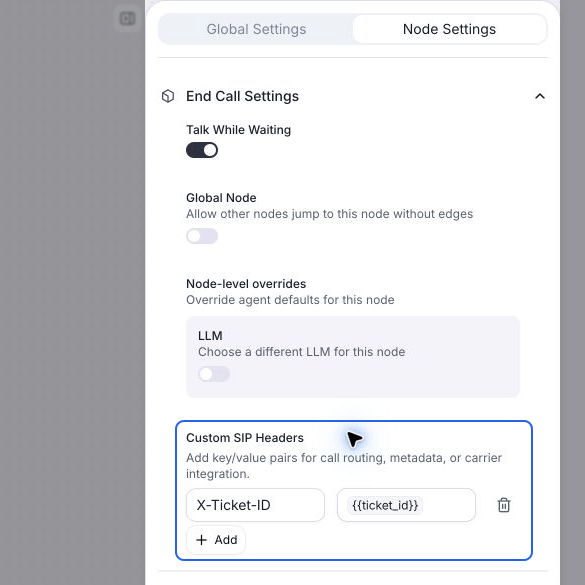
* **Talk While Waiting**: When enabled, a text box appears where you define the closing message the agent speaks before hanging up. Choose **Prompt** to let the LLM generate a farewell from your instruction, or **Static Sentence** for an exact line like `Goodbye, have a nice day`.
* **Global Node**: Make the end node reachable from anywhere in the flow when its condition is met — for example `User wants to end the call or says goodbye` — so you don't have to wire an edge to it from every node. Read more at [global node](/build/conversation-flow/global-node).
## Custom SIP headers
For phone calls, open the end node's settings and use **Custom SIP Headers** to send metadata when this node ends the call. Click **Add**, enter a header name starting with `X-` or `x-`, and set a static value or a dynamic variable such as `{{appointment_id}}`. Valid edits save when you leave the field.
For example, set `X-Call-Outcome` to `booked` on the booking path and `cancelled` on the cancellation path. Each end node can have its own headers. See [end-call SIP headers](/build/telephony/sip-headers#set-custom-sip-headers-when-ending-a-call) for naming rules and configuration details.
 ## End node vs End Call tool
Use an end node when the call should end at a fixed point in the flow. If instead the agent should be able to end the call mid-dialogue whenever it judges the conversation complete, attach an [End Call tool](/build/single-multi-prompt/end-call) to a [subagent node](/build/conversation-flow/subagent-node).
## End node vs End Call tool
Use an end node when the call should end at a fixed point in the flow. If instead the agent should be able to end the call mid-dialogue whenever it judges the conversation complete, attach an [End Call tool](/build/single-multi-prompt/end-call) to a [subagent node](/build/conversation-flow/subagent-node).