> ## Documentation Index
> Fetch the complete documentation index at: https://docs.retellai.com/llms.txt
> Use this file to discover all available pages before exploring further.
# Create chat agent
> Build a Retell chat agent in the dashboard or API for text conversations, convert a voice agent to chat, and deploy via web widget, SMS, or API.
Chat agents hold text conversations with your users. They use the same prompt types, [functions](/build/add-function-calling), and [knowledge bases](/build/knowledge-base) as voice agents, so you can offer the experience you built for calls over text as well — on your website, over SMS, or inside your own app.
Retell has no built-in integrations with third-party chat platforms such as WhatsApp or Messenger. Beyond the [website widget](/deploy/chat-widget) and [SMS](/deploy/enable-sms), you connect your own channel through the [chat API](/api-references/create-chat).
## When to use a chat agent
Use a chat agent when your users type instead of talk:
* **Website support** — answer product, billing, or order questions in a chat widget on your site.
* **SMS conversations** — run two-way text threads on a Twilio number, such as appointment reminders with reschedule handling.
* **In-app assistant** — power a chat UI you build into your own web or mobile app.
For example, an e-commerce store embeds a chat agent in its help center to handle order-status questions: the agent looks up the order with a custom function and replies with the tracking link, so support staff only see the conversations the agent escalates.
## Create a chat agent
In the dashboard, open **Agents**, click **Create an Agent**, and select **Chat Agent**.
Choose **Single prompt** for simple free-form conversations or **Conversational flow** for production-ready, deterministic flows. **Multi-Prompt (Legacy)** is available under **Other options**. Custom LLM is voice-only, so it can't power a chat agent.
Write the [prompt](/build/prompt-engineering-guide), attach functions and a knowledge base, and adjust the chat settings described below.
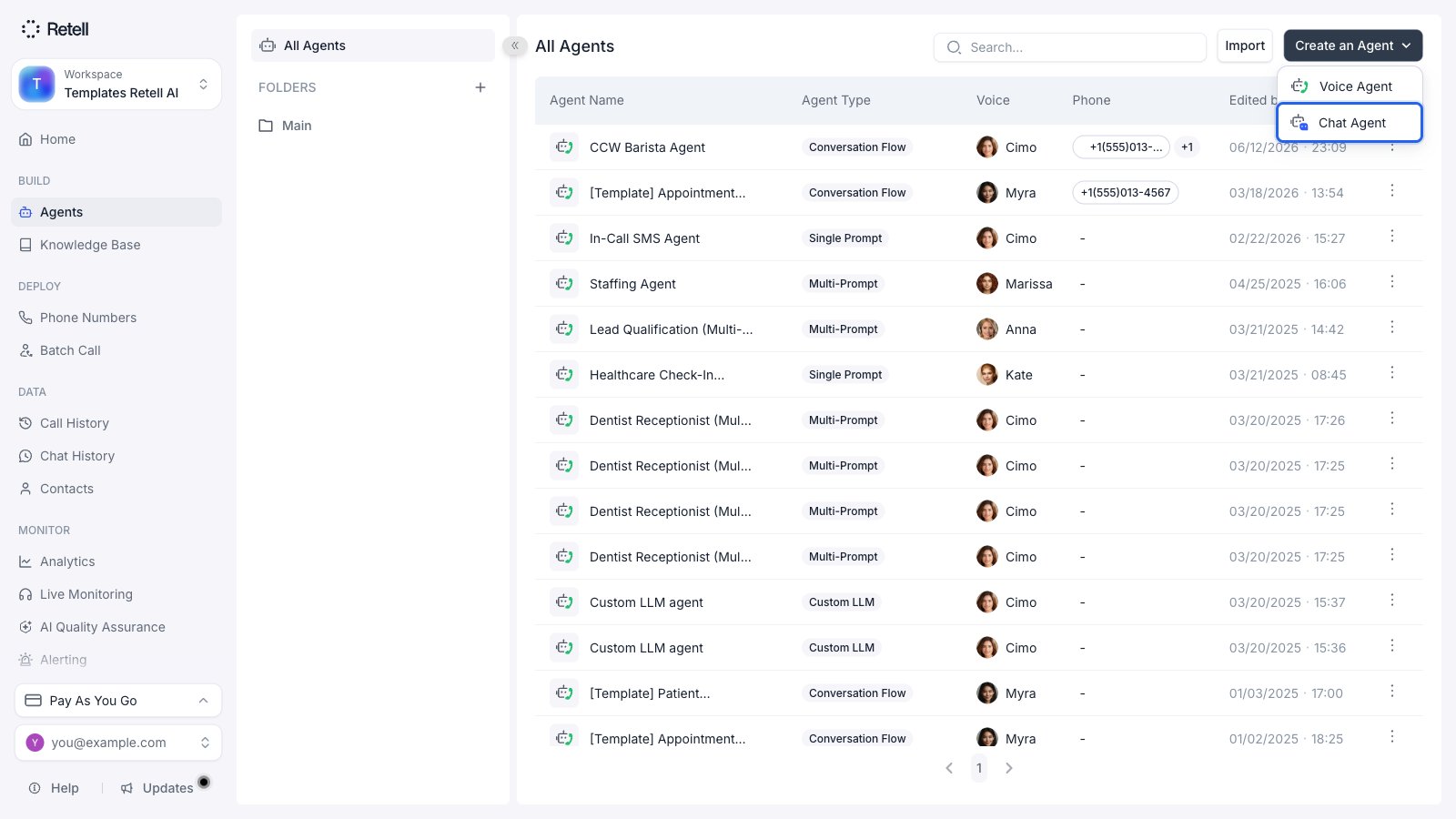 To create chat agents programmatically, call [Create Chat Agent](/api-references/create-chat-agent) with a Retell LLM or conversation flow response engine.
## Convert an existing voice agent
Converting creates a **new chat agent** based on your voice agent's setup. The original voice agent is not modified and keeps working as before.
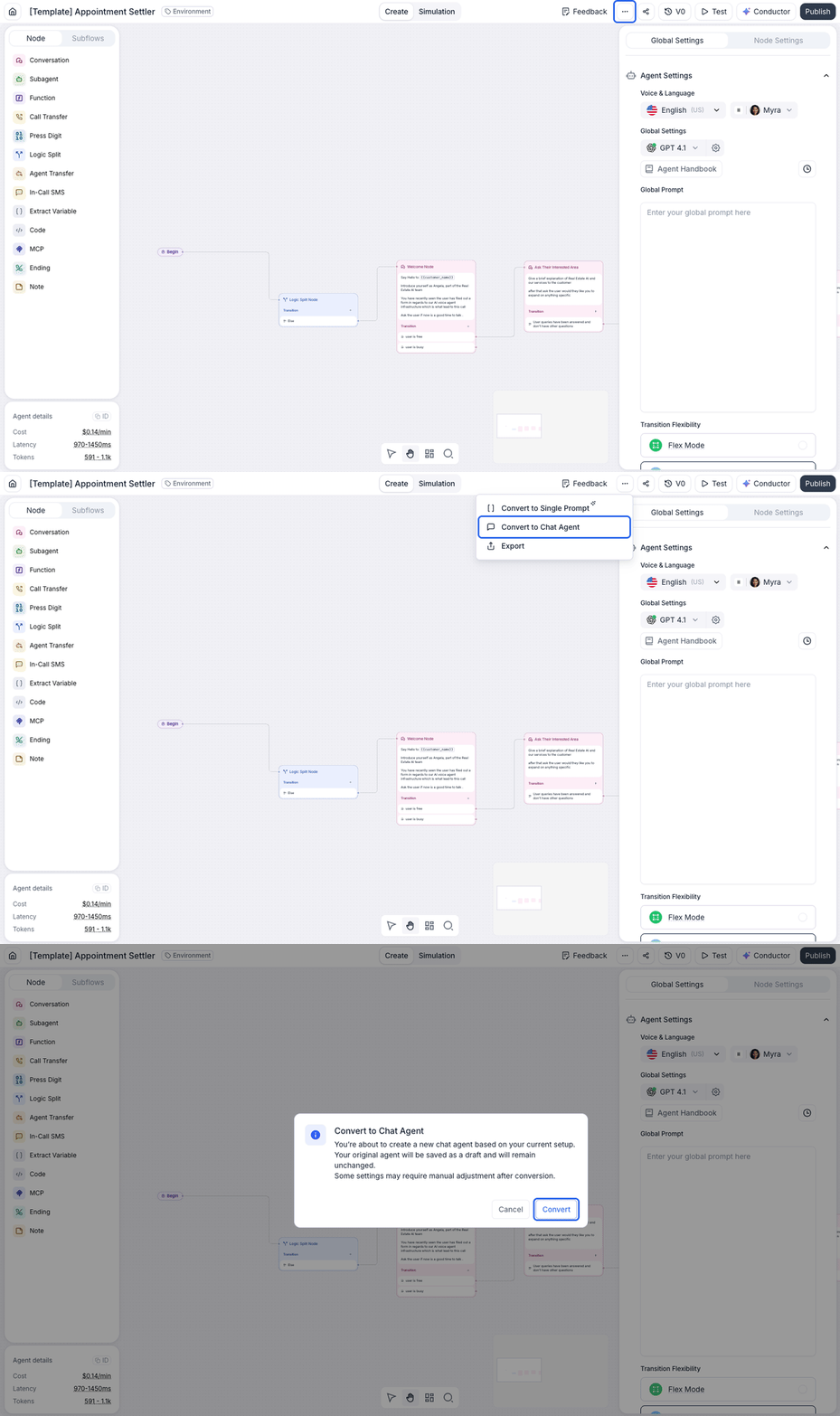
In the agent builder, click the **More options** menu in the top-right corner and select **Convert to Chat Agent**.
A dialog confirms that a new chat agent will be created and your original agent stays unchanged. Click **Convert**.
Retell opens the new chat agent. Voice-only features are removed during conversion, so review the prompt and flow and adjust anything that referenced them.
Conversion removes what doesn't apply to text:
* **Nodes and functions**: call transfer (including bridge and cancel transfer), press digit (IVR navigation), and mid-call SMS are deleted, and any dangling flow connections are cleaned up.
* **Settings**: voice, speech, transcription, and call settings (voicemail detection, DTMF input, and similar) don't exist on chat agents.
To create chat agents programmatically, call [Create Chat Agent](/api-references/create-chat-agent) with a Retell LLM or conversation flow response engine.
## Convert an existing voice agent
Converting creates a **new chat agent** based on your voice agent's setup. The original voice agent is not modified and keeps working as before.
In the agent builder, click the **More options** menu in the top-right corner and select **Convert to Chat Agent**.
A dialog confirms that a new chat agent will be created and your original agent stays unchanged. Click **Convert**.
Retell opens the new chat agent. Voice-only features are removed during conversion, so review the prompt and flow and adjust anything that referenced them.
Conversion removes what doesn't apply to text:
* **Nodes and functions**: call transfer (including bridge and cancel transfer), press digit (IVR navigation), and mid-call SMS are deleted, and any dangling flow connections are cleaned up.
* **Settings**: voice, speech, transcription, and call settings (voicemail detection, DTMF input, and similar) don't exist on chat agents.
 Conversion works in both directions: a chat agent's **More options** menu offers **Convert to Voice Agent**.
## Chat settings
Chat agents share most configuration with voice agents — prompt, functions, knowledge base, [webhooks](/features/webhook-overview), security, and Post Chat Extraction — and add a **Chat Settings** section:
* **Auto-close inactive chats** — end the chat automatically when the user stops responding. Set the timeout anywhere from 2 minutes to 72 hours (`end_chat_after_silence_ms`; the API default is 1 hour).
* **Auto-close message** — an optional message sent when a chat is closed automatically (`auto_close_message`).
For chat events, webhooks fire `chat_started`, `chat_ended`, and `chat_analyzed` by default; add `transcript_updated` through the agent's `webhook_events` if you need per-message updates.
The agent's **Workflow** page works the same as it does for voice, with the two function slots named **pre-chat** and **post-chat functions**: look the user up in your CRM before the agent's first message, then log the outcome once the chat ends. See [agent workflow](/agent/agent-workflow).
## Deploy your chat agent
Chat agents are headless — Retell does not host a chat UI for end users, so you choose how to surface the agent:
* **Website widget** — embed a single `
Conversion works in both directions: a chat agent's **More options** menu offers **Convert to Voice Agent**.
## Chat settings
Chat agents share most configuration with voice agents — prompt, functions, knowledge base, [webhooks](/features/webhook-overview), security, and Post Chat Extraction — and add a **Chat Settings** section:
* **Auto-close inactive chats** — end the chat automatically when the user stops responding. Set the timeout anywhere from 2 minutes to 72 hours (`end_chat_after_silence_ms`; the API default is 1 hour).
* **Auto-close message** — an optional message sent when a chat is closed automatically (`auto_close_message`).
For chat events, webhooks fire `chat_started`, `chat_ended`, and `chat_analyzed` by default; add `transcript_updated` through the agent's `webhook_events` if you need per-message updates.
The agent's **Workflow** page works the same as it does for voice, with the two function slots named **pre-chat** and **post-chat functions**: look the user up in your CRM before the agent's first message, then log the outcome once the chat ends. See [agent workflow](/agent/agent-workflow).
## Deploy your chat agent
Chat agents are headless — Retell does not host a chat UI for end users, so you choose how to surface the agent:
* **Website widget** — embed a single `