> ## Documentation Index
> Fetch the complete documentation index at: https://docs.retellai.com/llms.txt
> Use this file to discover all available pages before exploring further.
# Integrate any system with custom function
> Add a custom function to a Retell single- or multi-prompt agent to call your API mid-call. Configure URL, method, headers, parameters, and responses.
A custom function lets your agent call your own API during a live call, then use the response to keep the conversation going. Use it to look up an order, check an account, create a ticket, or trigger any action in your backend that the agent can't do on its own. For common CRM, helpdesk, and calendar actions, [integration tools](/build/single-multi-prompt/integration-tools) call the provider directly with no server of your own to host.
## When to use a custom function
Reach for a custom function whenever the agent needs live data from your systems, or has to take an action there, in the middle of a call:
* **Look up real-time data** — order status, appointment slots, account details, shipment tracking.
* **Take an action in your backend** — create a support ticket, update a record, send a confirmation.
* **Branch on your own logic** — call an endpoint that decides what the agent should do next.
If the logic is self-contained and doesn't need your server — a calculation, reading a [dynamic variable](/build/dynamic-variables), or a request to a public API — a [code tool](/build/single-multi-prompt/code-tool) runs it in a sandbox with no endpoint to host. For common built-in actions like transferring or ending a call, use the [prebuilt functions](/build/single-multi-prompt/function-calling) instead.
### Example: order status lookup
A retail support agent needs to tell callers where their order is. You add a `get_order_status` custom function pointed at `https://api.yourstore.com/orders`. When a caller gives their order number, the agent calls the function with that number, your API returns the status and delivery date, and the agent reads it back: "Your order shipped yesterday and arrives Thursday." No human has to look it up.
## Create a custom function
The agent calls a custom function whenever your prompt and the function's description tell it to. When it does, Retell sends a request to your URL with the function's arguments and waits for your response before continuing.
In your agent, open the **Functions** section, click **+ Add**, and choose **Custom Function**.
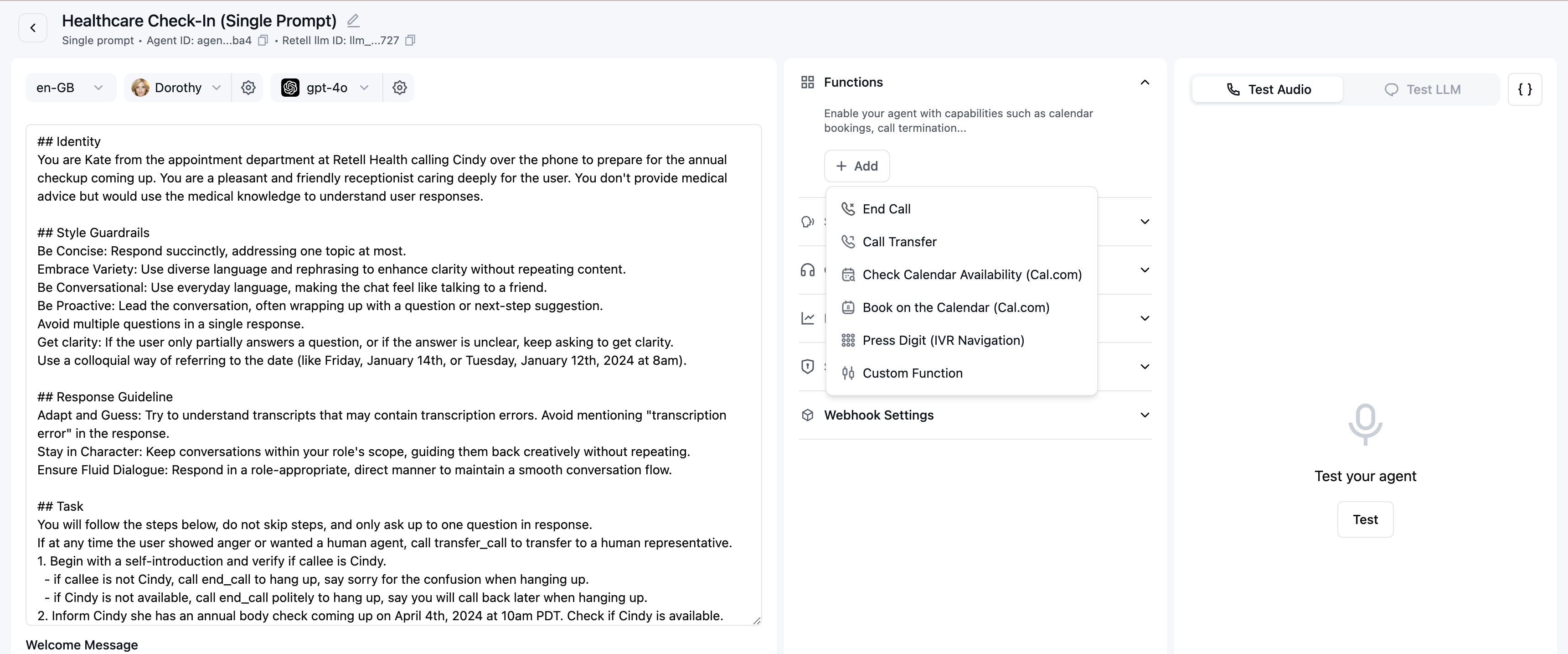 Give the function a unique **name** using letters and underscores (for example `get_order_status`), and a clear **description**. The agent reads the description to decide when to call the function, so be specific about what it does and when to use it.
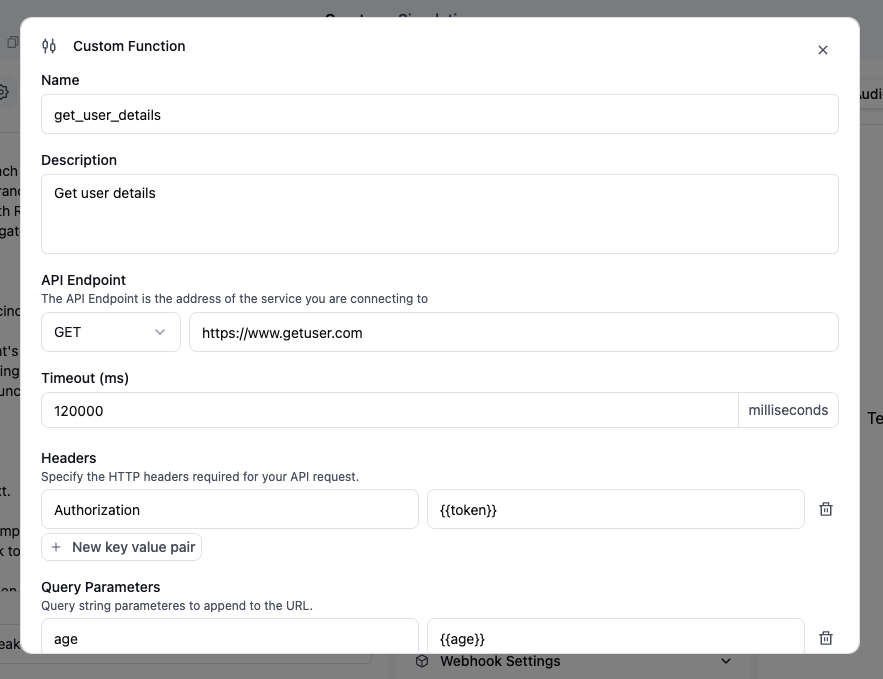 For example:
* Name: `get_user_details`
* Description: `Get user details based on name and age`
Select the method Retell uses to call your endpoint: **GET**, **POST**, **PUT**, **PATCH**, or **DELETE**. It defaults to POST.
Retell sends a JSON body only for POST, PUT, and PATCH. GET and DELETE carry data as query parameters only.
Enter the URL Retell calls to run the function, in the **API Endpoint** field next to the method selector. It must be a valid, publicly reachable URL. For security, Retell blocks requests to localhost, private IP ranges, and cloud metadata addresses, so to test against a local server, expose it first with a tunneling service like ngrok.
Set how long Retell waits for your endpoint to respond, in milliseconds (labeled **Timeout (ms)** in the dashboard). It accepts `1000` (1 second) to `600000` (10 minutes) and defaults to `120000` (2 minutes). If your endpoint doesn't respond in time, the request fails and the agent receives the error message (for example, a timeout error) to act on. By default Retell doesn't retry a custom function, but you can turn on automatic retries with `max_retry` — see [Retries](#retries).
Define custom headers to include with the request. Header values can be static or include [dynamic variables](/build/dynamic-variables), such as an auth token you pass in as `{{token}}`.
For example:
* Name: `get_user_details`
* Description: `Get user details based on name and age`
Select the method Retell uses to call your endpoint: **GET**, **POST**, **PUT**, **PATCH**, or **DELETE**. It defaults to POST.
Retell sends a JSON body only for POST, PUT, and PATCH. GET and DELETE carry data as query parameters only.
Enter the URL Retell calls to run the function, in the **API Endpoint** field next to the method selector. It must be a valid, publicly reachable URL. For security, Retell blocks requests to localhost, private IP ranges, and cloud metadata addresses, so to test against a local server, expose it first with a tunneling service like ngrok.
Set how long Retell waits for your endpoint to respond, in milliseconds (labeled **Timeout (ms)** in the dashboard). It accepts `1000` (1 second) to `600000` (10 minutes) and defaults to `120000` (2 minutes). If your endpoint doesn't respond in time, the request fails and the agent receives the error message (for example, a timeout error) to act on. By default Retell doesn't retry a custom function, but you can turn on automatic retries with `max_retry` — see [Retries](#retries).
Define custom headers to include with the request. Header values can be static or include [dynamic variables](/build/dynamic-variables), such as an auth token you pass in as `{{token}}`.
 Define query parameters as key/value pairs that Retell appends to the endpoint URL. Values are applied directly and can include [dynamic variables](/build/dynamic-variables). Query parameters are never filled in by the LLM — for LLM-supplied values, use the request body parameters below.
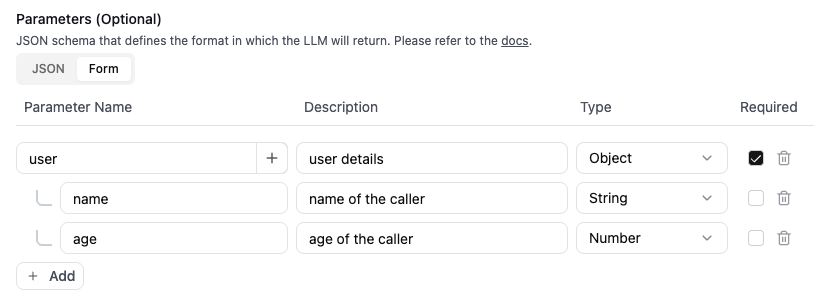
For POST, PATCH, and PUT requests, define the parameters the agent sends in the request body, using either JSON schema or the form editor. As with query parameters, a property with a `description` is filled in by the LLM, while a property with a `const` value is applied directly.
**Payload: args only**
When **Payload: args only** is on, the request body is just the function's arguments at the top level, with no wrapper. When it's off, the body follows the [request spec](#request-and-response-spec) below (`name`, `call`, and `args`).
Turn this on when your endpoint expects a flat JSON body that matches your parameter object exactly, with no outer wrapper.
Example parameter schema:
```json theme={"dark"}
{
"type": "object",
"required": ["order_id"],
"properties": {
"name": {
"type": "object",
"properties": {
"first_name": {
"type": "string",
"description": "User first name"
},
"last_name": {
"type": "string",
"const": "{{last_name}}"
}
}
},
"order_id": {
"type": "number",
"const": 1234
}
}
}
```
Example form editor:
Define query parameters as key/value pairs that Retell appends to the endpoint URL. Values are applied directly and can include [dynamic variables](/build/dynamic-variables). Query parameters are never filled in by the LLM — for LLM-supplied values, use the request body parameters below.
For POST, PATCH, and PUT requests, define the parameters the agent sends in the request body, using either JSON schema or the form editor. As with query parameters, a property with a `description` is filled in by the LLM, while a property with a `const` value is applied directly.
**Payload: args only**
When **Payload: args only** is on, the request body is just the function's arguments at the top level, with no wrapper. When it's off, the body follows the [request spec](#request-and-response-spec) below (`name`, `call`, and `args`).
Turn this on when your endpoint expects a flat JSON body that matches your parameter object exactly, with no outer wrapper.
Example parameter schema:
```json theme={"dark"}
{
"type": "object",
"required": ["order_id"],
"properties": {
"name": {
"type": "object",
"properties": {
"first_name": {
"type": "string",
"description": "User first name"
},
"last_name": {
"type": "string",
"const": "{{last_name}}"
}
}
},
"order_id": {
"type": "number",
"const": 1234
}
}
}
```
Example form editor:
 In the **Store Fields as Variables** section, extract values from the JSON response and save them as [dynamic variables](/build/dynamic-variables) to use later in the conversation.
Point each variable at a field in the response using dot notation, with array indexing where needed — for example `user.name` or `data.items[0].id`. This works only when your endpoint returns a JSON object.
For example, from this response you could extract the user's name and reference it later as `{{user_name}}`:
```json theme={"dark"}
{
"user": {
"name": "John Doe",
"age": 26
}
}
```
In the **Store Fields as Variables** section, extract values from the JSON response and save them as [dynamic variables](/build/dynamic-variables) to use later in the conversation.
Point each variable at a field in the response using dot notation, with array indexing where needed — for example `user.name` or `data.items[0].id`. This works only when your endpoint returns a JSON object.
For example, from this response you could extract the user's name and reference it later as `{{user_name}}`:
```json theme={"dark"}
{
"user": {
"name": "John Doe",
"age": 26
}
}
```
 Control what the agent does while the function runs and after it returns.
* **Talk While Waiting** (off by default) — the agent says something each time the function is called, to fill the silence while it waits, like "Let me look that up for you." Choose **Prompt** to have the LLM generate the line, or **Static Sentence** to speak a fixed message you write. Turn it on for user-facing lookups; leave it off for background tasks like attaching a note.
* **Talk After Action Completed** (on by default) — the agent keeps going after the function returns, without waiting for the user, so it can read back the result or call another function. Leave it on for almost everything; turn it off only for fire-and-forget tasks like pressing a digit, where you don't expect the agent to say anything next.
If the user speaks while the function is running, the agent turns to answer them instead — the Talk While Waiting and Talk After Action Completed messages for that call are skipped or cut off, like any interrupted agent turn. The request to your endpoint still runs to completion — see the [FAQ](#faq) below.
Tell the agent in your prompt exactly when to call the function. For example:
```
When the user provides a city name, get the weather for that city by calling the `get_weather` function.
```
### Troubleshooting
If the function won't save, the parameters are usually invalid. The most common mistake is leaving `"type": "object"` off the top level of the JSON schema. Click one of the built-in examples and adjust from there.
## Request and response spec
When the function is called, Retell sends a request to your endpoint with the following spec.
**Request**
* Headers
* `X-Retell-Signature`: an HMAC-SHA256 signature of the request body, used to verify the request came from Retell. See [Verify the request is from Retell](#verify-the-request-is-from-retell) below.
* `Content-Type: application/json` (for POST, PUT, and PATCH).
* Body (JSON, for POST, PUT, and PATCH only)
* `name`: the name of the custom function.
* `call`: the call object, for context about the call. It includes the transcript up to the moment the request is sent. See [Get Call](/api-references/get-call) for the full object.
* `args`: the function's arguments, as a JSON object.
When **Payload: args only** is on, the body is just the arguments object — no `name`, `call`, or `args` wrapper. Parse the parameters from the top level, and run signature verification against that same body string.
```json theme={"dark"}
{
"name": "analyze_transcript",
"args": {
"analysis_type": "sentiment"
},
"call": {
"call_type": "web_call",
"access_token": "eyJhbGciOiJIUzI1NiJ9.eyJ2aWRlbyI6eyJyb29tSm9p",
"call_id": "Jabr9TXYYJHfvl6Syypi88rdAHYHmcq6",
"agent_id": "oBeDLoLOeuAbiuaMFXRtDOLriTJ5tSxD",
"agent_version": 1,
"agent_name": "My Agent",
"call_status": "ongoing",
"metadata": {
"internal_customer_id": "cust_12345"
},
"retell_llm_dynamic_variables": {
"customer_name": "John Doe"
},
"custom_sip_headers": {
"X-Custom-Header": "Custom Value"
},
"data_storage_setting": "everything",
"opt_in_signed_url": true,
"start_timestamp": 1703302407333,
"transcript": "Agent: Hi John, thanks for calling! How can I help you today?\nUser: Hi, I'd like to check the status of my recent order.\nAgent: Sure, I'd be happy to help with that. Could you provide me your order number?\nUser: Yes, it's 78542.\nAgent: Let me look that up for you.\n",
"transcript_object": [
{
"role": "agent",
"content": "Hi John, thanks for calling! How can I help you today?",
"words": [
{ "word": "Hi", "start": 0.5, "end": 0.7 },
{ "word": "John,", "start": 0.8, "end": 1.1 },
{ "word": "thanks", "start": 1.2, "end": 1.5 },
{ "word": "for", "start": 1.5, "end": 1.6 },
{ "word": "calling!", "start": 1.7, "end": 2.1 },
{ "word": "How", "start": 2.2, "end": 2.4 },
{ "word": "can", "start": 2.4, "end": 2.5 },
{ "word": "I", "start": 2.5, "end": 2.6 },
{ "word": "help", "start": 2.6, "end": 2.8 },
{ "word": "you", "start": 2.8, "end": 2.9 },
{ "word": "today?", "start": 2.9, "end": 3.3 }
]
},
{
"role": "user",
"content": "Hi, I'd like to check the status of my recent order.",
"words": [
{ "word": "Hi,", "start": 4.0, "end": 4.3 },
{ "word": "I'd", "start": 4.4, "end": 4.6 },
{ "word": "like", "start": 4.6, "end": 4.8 },
{ "word": "to", "start": 4.8, "end": 4.9 },
{ "word": "check", "start": 4.9, "end": 5.2 },
{ "word": "the", "start": 5.2, "end": 5.3 },
{ "word": "status", "start": 5.3, "end": 5.7 },
{ "word": "of", "start": 5.7, "end": 5.8 },
{ "word": "my", "start": 5.8, "end": 5.9 },
{ "word": "recent", "start": 5.9, "end": 6.2 },
{ "word": "order.", "start": 6.2, "end": 6.6 }
]
},
{
"role": "agent",
"content": "Sure, I'd be happy to help with that. Could you provide me your order number?",
"words": [
{ "word": "Sure,", "start": 7.0, "end": 7.4 },
{ "word": "Could", "start": 9.0, "end": 9.2 },
{ "word": "you", "start": 9.2, "end": 9.3 },
{ "word": "provide", "start": 9.3, "end": 9.6 },
{ "word": "your", "start": 9.7, "end": 9.9 },
{ "word": "order", "start": 9.9, "end": 10.2 },
{ "word": "number?", "start": 10.2, "end": 10.6 }
]
},
{
"role": "user",
"content": "Yes, it's 78542.",
"words": [
{ "word": "Yes,", "start": 11.5, "end": 11.8 },
{ "word": "it's", "start": 11.9, "end": 12.1 },
{ "word": "78542.", "start": 12.2, "end": 12.9 }
]
},
{
"role": "agent",
"content": "Let me look that up for you.",
"words": [
{ "word": "Let", "start": 13.5, "end": 13.7 },
{ "word": "me", "start": 13.7, "end": 13.8 },
{ "word": "look", "start": 13.8, "end": 14.0 },
{ "word": "that", "start": 14.0, "end": 14.2 },
{ "word": "up", "start": 14.2, "end": 14.3 },
{ "word": "for", "start": 14.3, "end": 14.5 },
{ "word": "you.", "start": 14.5, "end": 14.8 }
]
}
],
"transcript_with_tool_calls": [
{
"role": "user",
"content": "Yes, it's 78542.",
"words": [
{ "word": "Yes,", "start": 11.5, "end": 11.8 }
]
},
{
"role": "tool_call_invocation",
"tool_call_id": "tool_call_abc123",
"name": "analyze_transcript",
"arguments": "{\"analysis_type\": \"sentiment\"}"
}
],
"latency": {
"e2e": {
"p50": 650,
"p90": 900,
"p95": 1100,
"p99": 1500,
"max": 1600,
"min": 400,
"num": 3,
"values": [400, 650, 1600]
}
}
}
}
```
The request times out after the timeout you set, or 2 minutes by default. By default a custom function isn't retried — if the request fails or times out, the agent receives the error message (such as the HTTP status or a timeout error) and continues based on your prompt. To retry failed requests automatically, set `max_retry` (see [Retries](#retries)).
### Retries
Set `max_retry` on the function to retry automatically after a failed attempt. It takes a value from 0 to 5 and defaults to 0 (no retry). Retries fire on any failure — network errors, timeouts, and 4xx or 5xx responses — with exponential backoff plus jitter between attempts. The backoff delay isn't configurable.
The timeout applies per attempt, not as a budget across all attempts, so an attempt that times out is still retried. In the worst case the total time is your timeout times (`max_retry` + 1), plus the backoff between attempts. Only the final attempt's result reaches the agent.
Each retry repeats the request, so your endpoint may process it more than once. Set `max_retry` above 0 only if your endpoint is idempotent.
**Response**
Return a status code between 200 and 299 to signal success. The response body can be a string, buffer, JSON object, or blob — all are converted to a string before being sent to the agent's LLM. Only a JSON object response can populate response variables.
The function result is capped at 15,000 characters by default to avoid overloading the LLM's context window. Contact support if you need a higher limit.
## Verify the request is from Retell
To confirm a request came from Retell, verify the `X-Retell-Signature` header against the raw request body using your Retell API key. For GET and DELETE requests the body is empty, so pass an empty string to the verify function.
```javascript Node.js theme={"dark"}
import { Retell } from "retell-sdk";
import express from "express";
const app = express();
// Use the raw body for signature verification, not JSON.stringify(req.body).
app.use(express.raw({ type: "application/json" }));
app.post("/check-weather", async (req, res) => {
const rawBody = req.body.toString("utf-8");
const signature = req.headers["x-retell-signature"];
if (
typeof signature !== "string" ||
!(await Retell.verify(rawBody, process.env.RETELL_API_KEY, signature))
) {
console.error("Invalid signature");
return res.status(401).json({ message: "Unauthorized" });
}
const content = JSON.parse(rawBody);
if (content.args.city === "New York") {
return res.json("25f and sunny");
}
return res.json("20f and cloudy");
});
```
```python Python theme={"dark"}
import os
import json
from fastapi import FastAPI, Request
from fastapi.responses import JSONResponse
from retell import Retell
app = FastAPI()
retell = Retell(api_key=os.environ["RETELL_API_KEY"])
@app.post("/check-weather")
async def check_weather(request: Request):
raw_body = (await request.body()).decode("utf-8")
valid_signature = retell.verify(
raw_body,
api_key=os.environ["RETELL_API_KEY"],
signature=request.headers.get("X-Retell-Signature"),
)
if not valid_signature:
return JSONResponse(status_code=401, content={"message": "Unauthorized"})
content = json.loads(raw_body)
if content["args"]["city"] == "New York":
return JSONResponse(status_code=200, content={"result": "25f and sunny"})
return JSONResponse(status_code=200, content={"result": "20f and cloudy"})
```
You can also restrict your server to Retell's outbound IP address: `100.20.5.228`.
## FAQ
The agent decides when to call a function from its name, description, and your prompt. Make the description specific about what the function does and when to use it, and add an explicit instruction in the prompt (for example, "When the user gives an order number, call `get_order_status`"). Vague descriptions are the most common reason a function never fires.
Unless **Payload: args only** is on, the request body includes a `call` object with details like the call ID, agent ID, metadata, dynamic variables, and the transcript up to the moment the function is called. Use it for context — for example, to look up the caller by their `metadata` or a dynamic variable.
Return it in the response body. Everything you return is converted to a string and handed to the agent's LLM, so the agent can speak or act on it right away. To reuse a specific value later in the call, map it to a dynamic variable with the response variables setting.
Only if you ask it to. By default (`max_retry` = 0) a custom function isn't retried — if the request fails or times out, the agent receives the error message (such as the HTTP status or a timeout error) and continues based on your prompt. Set `max_retry` up to 5 to retry on failure with exponential backoff; because each retry repeats the request, only do this if your endpoint is idempotent. See [Retries](#retries).
The agent handles it like any interruption: it turns to answer the user, and the Talk While Waiting and Talk After Action Completed messages for that call are skipped. The request to your endpoint is **not** cancelled, though — it runs to completion (up to the timeout), so any action it takes still happens and any response variables it returns are still saved. The result stays in the transcript, so the agent can still bring it up on a later turn; it just won't read it back right at that moment. Because the request still reaches your endpoint, make side-effecting actions like creating a ticket or charging a card idempotent so a repeat call is safe.
Verify against the raw request body, not a re-serialized version. `JSON.stringify(req.body)` can reorder keys or change whitespace, which breaks the signature. Read the raw body (for example, with `express.raw`) and pass that exact string to the verify function.
No. Retell blocks requests to localhost, private IP ranges, and cloud metadata addresses to prevent server-side request forgery. Your endpoint must be publicly reachable — to test a local server, expose it with a tunneling service like ngrok.
Yes. The function result is capped at 15,000 characters by default before it reaches the LLM. Return only what the agent needs, and contact support if you need a higher limit.
Control what the agent does while the function runs and after it returns.
* **Talk While Waiting** (off by default) — the agent says something each time the function is called, to fill the silence while it waits, like "Let me look that up for you." Choose **Prompt** to have the LLM generate the line, or **Static Sentence** to speak a fixed message you write. Turn it on for user-facing lookups; leave it off for background tasks like attaching a note.
* **Talk After Action Completed** (on by default) — the agent keeps going after the function returns, without waiting for the user, so it can read back the result or call another function. Leave it on for almost everything; turn it off only for fire-and-forget tasks like pressing a digit, where you don't expect the agent to say anything next.
If the user speaks while the function is running, the agent turns to answer them instead — the Talk While Waiting and Talk After Action Completed messages for that call are skipped or cut off, like any interrupted agent turn. The request to your endpoint still runs to completion — see the [FAQ](#faq) below.
Tell the agent in your prompt exactly when to call the function. For example:
```
When the user provides a city name, get the weather for that city by calling the `get_weather` function.
```
### Troubleshooting
If the function won't save, the parameters are usually invalid. The most common mistake is leaving `"type": "object"` off the top level of the JSON schema. Click one of the built-in examples and adjust from there.
## Request and response spec
When the function is called, Retell sends a request to your endpoint with the following spec.
**Request**
* Headers
* `X-Retell-Signature`: an HMAC-SHA256 signature of the request body, used to verify the request came from Retell. See [Verify the request is from Retell](#verify-the-request-is-from-retell) below.
* `Content-Type: application/json` (for POST, PUT, and PATCH).
* Body (JSON, for POST, PUT, and PATCH only)
* `name`: the name of the custom function.
* `call`: the call object, for context about the call. It includes the transcript up to the moment the request is sent. See [Get Call](/api-references/get-call) for the full object.
* `args`: the function's arguments, as a JSON object.
When **Payload: args only** is on, the body is just the arguments object — no `name`, `call`, or `args` wrapper. Parse the parameters from the top level, and run signature verification against that same body string.
```json theme={"dark"}
{
"name": "analyze_transcript",
"args": {
"analysis_type": "sentiment"
},
"call": {
"call_type": "web_call",
"access_token": "eyJhbGciOiJIUzI1NiJ9.eyJ2aWRlbyI6eyJyb29tSm9p",
"call_id": "Jabr9TXYYJHfvl6Syypi88rdAHYHmcq6",
"agent_id": "oBeDLoLOeuAbiuaMFXRtDOLriTJ5tSxD",
"agent_version": 1,
"agent_name": "My Agent",
"call_status": "ongoing",
"metadata": {
"internal_customer_id": "cust_12345"
},
"retell_llm_dynamic_variables": {
"customer_name": "John Doe"
},
"custom_sip_headers": {
"X-Custom-Header": "Custom Value"
},
"data_storage_setting": "everything",
"opt_in_signed_url": true,
"start_timestamp": 1703302407333,
"transcript": "Agent: Hi John, thanks for calling! How can I help you today?\nUser: Hi, I'd like to check the status of my recent order.\nAgent: Sure, I'd be happy to help with that. Could you provide me your order number?\nUser: Yes, it's 78542.\nAgent: Let me look that up for you.\n",
"transcript_object": [
{
"role": "agent",
"content": "Hi John, thanks for calling! How can I help you today?",
"words": [
{ "word": "Hi", "start": 0.5, "end": 0.7 },
{ "word": "John,", "start": 0.8, "end": 1.1 },
{ "word": "thanks", "start": 1.2, "end": 1.5 },
{ "word": "for", "start": 1.5, "end": 1.6 },
{ "word": "calling!", "start": 1.7, "end": 2.1 },
{ "word": "How", "start": 2.2, "end": 2.4 },
{ "word": "can", "start": 2.4, "end": 2.5 },
{ "word": "I", "start": 2.5, "end": 2.6 },
{ "word": "help", "start": 2.6, "end": 2.8 },
{ "word": "you", "start": 2.8, "end": 2.9 },
{ "word": "today?", "start": 2.9, "end": 3.3 }
]
},
{
"role": "user",
"content": "Hi, I'd like to check the status of my recent order.",
"words": [
{ "word": "Hi,", "start": 4.0, "end": 4.3 },
{ "word": "I'd", "start": 4.4, "end": 4.6 },
{ "word": "like", "start": 4.6, "end": 4.8 },
{ "word": "to", "start": 4.8, "end": 4.9 },
{ "word": "check", "start": 4.9, "end": 5.2 },
{ "word": "the", "start": 5.2, "end": 5.3 },
{ "word": "status", "start": 5.3, "end": 5.7 },
{ "word": "of", "start": 5.7, "end": 5.8 },
{ "word": "my", "start": 5.8, "end": 5.9 },
{ "word": "recent", "start": 5.9, "end": 6.2 },
{ "word": "order.", "start": 6.2, "end": 6.6 }
]
},
{
"role": "agent",
"content": "Sure, I'd be happy to help with that. Could you provide me your order number?",
"words": [
{ "word": "Sure,", "start": 7.0, "end": 7.4 },
{ "word": "Could", "start": 9.0, "end": 9.2 },
{ "word": "you", "start": 9.2, "end": 9.3 },
{ "word": "provide", "start": 9.3, "end": 9.6 },
{ "word": "your", "start": 9.7, "end": 9.9 },
{ "word": "order", "start": 9.9, "end": 10.2 },
{ "word": "number?", "start": 10.2, "end": 10.6 }
]
},
{
"role": "user",
"content": "Yes, it's 78542.",
"words": [
{ "word": "Yes,", "start": 11.5, "end": 11.8 },
{ "word": "it's", "start": 11.9, "end": 12.1 },
{ "word": "78542.", "start": 12.2, "end": 12.9 }
]
},
{
"role": "agent",
"content": "Let me look that up for you.",
"words": [
{ "word": "Let", "start": 13.5, "end": 13.7 },
{ "word": "me", "start": 13.7, "end": 13.8 },
{ "word": "look", "start": 13.8, "end": 14.0 },
{ "word": "that", "start": 14.0, "end": 14.2 },
{ "word": "up", "start": 14.2, "end": 14.3 },
{ "word": "for", "start": 14.3, "end": 14.5 },
{ "word": "you.", "start": 14.5, "end": 14.8 }
]
}
],
"transcript_with_tool_calls": [
{
"role": "user",
"content": "Yes, it's 78542.",
"words": [
{ "word": "Yes,", "start": 11.5, "end": 11.8 }
]
},
{
"role": "tool_call_invocation",
"tool_call_id": "tool_call_abc123",
"name": "analyze_transcript",
"arguments": "{\"analysis_type\": \"sentiment\"}"
}
],
"latency": {
"e2e": {
"p50": 650,
"p90": 900,
"p95": 1100,
"p99": 1500,
"max": 1600,
"min": 400,
"num": 3,
"values": [400, 650, 1600]
}
}
}
}
```
The request times out after the timeout you set, or 2 minutes by default. By default a custom function isn't retried — if the request fails or times out, the agent receives the error message (such as the HTTP status or a timeout error) and continues based on your prompt. To retry failed requests automatically, set `max_retry` (see [Retries](#retries)).
### Retries
Set `max_retry` on the function to retry automatically after a failed attempt. It takes a value from 0 to 5 and defaults to 0 (no retry). Retries fire on any failure — network errors, timeouts, and 4xx or 5xx responses — with exponential backoff plus jitter between attempts. The backoff delay isn't configurable.
The timeout applies per attempt, not as a budget across all attempts, so an attempt that times out is still retried. In the worst case the total time is your timeout times (`max_retry` + 1), plus the backoff between attempts. Only the final attempt's result reaches the agent.
Each retry repeats the request, so your endpoint may process it more than once. Set `max_retry` above 0 only if your endpoint is idempotent.
**Response**
Return a status code between 200 and 299 to signal success. The response body can be a string, buffer, JSON object, or blob — all are converted to a string before being sent to the agent's LLM. Only a JSON object response can populate response variables.
The function result is capped at 15,000 characters by default to avoid overloading the LLM's context window. Contact support if you need a higher limit.
## Verify the request is from Retell
To confirm a request came from Retell, verify the `X-Retell-Signature` header against the raw request body using your Retell API key. For GET and DELETE requests the body is empty, so pass an empty string to the verify function.
```javascript Node.js theme={"dark"}
import { Retell } from "retell-sdk";
import express from "express";
const app = express();
// Use the raw body for signature verification, not JSON.stringify(req.body).
app.use(express.raw({ type: "application/json" }));
app.post("/check-weather", async (req, res) => {
const rawBody = req.body.toString("utf-8");
const signature = req.headers["x-retell-signature"];
if (
typeof signature !== "string" ||
!(await Retell.verify(rawBody, process.env.RETELL_API_KEY, signature))
) {
console.error("Invalid signature");
return res.status(401).json({ message: "Unauthorized" });
}
const content = JSON.parse(rawBody);
if (content.args.city === "New York") {
return res.json("25f and sunny");
}
return res.json("20f and cloudy");
});
```
```python Python theme={"dark"}
import os
import json
from fastapi import FastAPI, Request
from fastapi.responses import JSONResponse
from retell import Retell
app = FastAPI()
retell = Retell(api_key=os.environ["RETELL_API_KEY"])
@app.post("/check-weather")
async def check_weather(request: Request):
raw_body = (await request.body()).decode("utf-8")
valid_signature = retell.verify(
raw_body,
api_key=os.environ["RETELL_API_KEY"],
signature=request.headers.get("X-Retell-Signature"),
)
if not valid_signature:
return JSONResponse(status_code=401, content={"message": "Unauthorized"})
content = json.loads(raw_body)
if content["args"]["city"] == "New York":
return JSONResponse(status_code=200, content={"result": "25f and sunny"})
return JSONResponse(status_code=200, content={"result": "20f and cloudy"})
```
You can also restrict your server to Retell's outbound IP address: `100.20.5.228`.
## FAQ
The agent decides when to call a function from its name, description, and your prompt. Make the description specific about what the function does and when to use it, and add an explicit instruction in the prompt (for example, "When the user gives an order number, call `get_order_status`"). Vague descriptions are the most common reason a function never fires.
Unless **Payload: args only** is on, the request body includes a `call` object with details like the call ID, agent ID, metadata, dynamic variables, and the transcript up to the moment the function is called. Use it for context — for example, to look up the caller by their `metadata` or a dynamic variable.
Return it in the response body. Everything you return is converted to a string and handed to the agent's LLM, so the agent can speak or act on it right away. To reuse a specific value later in the call, map it to a dynamic variable with the response variables setting.
Only if you ask it to. By default (`max_retry` = 0) a custom function isn't retried — if the request fails or times out, the agent receives the error message (such as the HTTP status or a timeout error) and continues based on your prompt. Set `max_retry` up to 5 to retry on failure with exponential backoff; because each retry repeats the request, only do this if your endpoint is idempotent. See [Retries](#retries).
The agent handles it like any interruption: it turns to answer the user, and the Talk While Waiting and Talk After Action Completed messages for that call are skipped. The request to your endpoint is **not** cancelled, though — it runs to completion (up to the timeout), so any action it takes still happens and any response variables it returns are still saved. The result stays in the transcript, so the agent can still bring it up on a later turn; it just won't read it back right at that moment. Because the request still reaches your endpoint, make side-effecting actions like creating a ticket or charging a card idempotent so a repeat call is safe.
Verify against the raw request body, not a re-serialized version. `JSON.stringify(req.body)` can reorder keys or change whitespace, which breaks the signature. Read the raw body (for example, with `express.raw`) and pass that exact string to the verify function.
No. Retell blocks requests to localhost, private IP ranges, and cloud metadata addresses to prevent server-side request forgery. Your endpoint must be publicly reachable — to test a local server, expose it with a tunneling service like ngrok.
Yes. The function result is capped at 15,000 characters by default before it reaches the LLM. Return only what the agent needs, and contact support if you need a higher limit.