> ## Documentation Index
> Fetch the complete documentation index at: https://docs.retellai.com/llms.txt
> Use this file to discover all available pages before exploring further.
# Capture DTMF input from user
> Capture DTMF keypad input from callers in Retell agents — accept PINs, menu choices, and numeric entries, and configure completion timing and digit counts.
The user can provide information via DTMF (phone keypad presses) instead of voice. For example, entering a PIN is easier to press on the keypad than to say aloud in public.
DTMF input is captured by default and factored into the agent's responses. To use it, prompt the agent to ask for the information via DTMF.
## When to use it
Reach for DTMF capture whenever a caller needs to enter something more reliably or privately than by voice:
* Collecting a PIN, account number, or verification code.
* Confirming a menu choice ("Press 1 to confirm, 2 to reschedule").
* Capturing numeric input in a noisy environment where speech recognition is unreliable.
To capture voicemail or IVR responses on outbound calls instead, see [handle voicemail and IVR](/build/handle-voicemail).
## DTMF input completion options
The agent supports three methods for determining when DTMF input is complete:
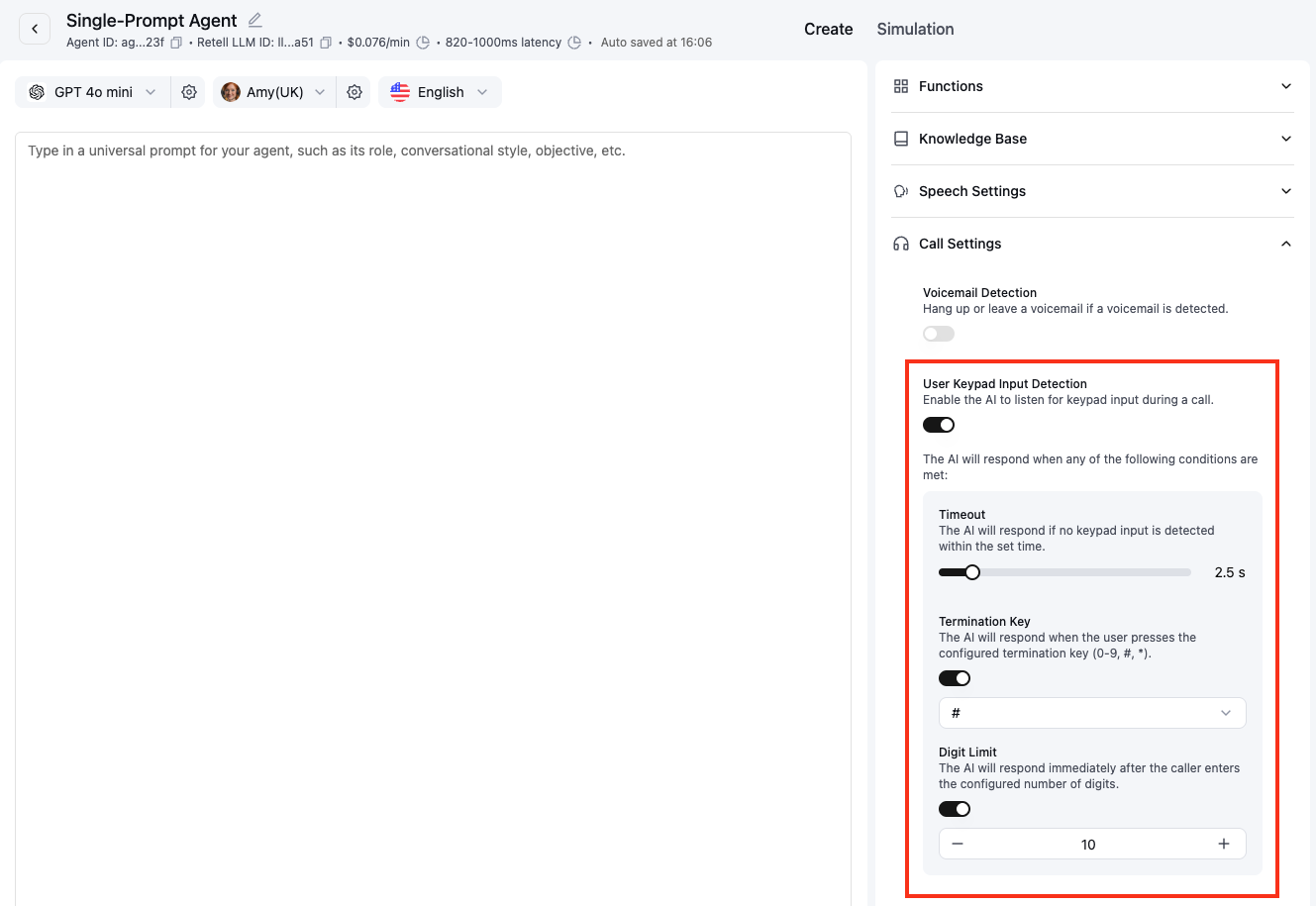
* **Digit limit (`user_dtmf_options.digit_limit`)**\
The maximum number of digits the user can enter per turn (1–50). Once this limit is reached, input is considered complete and the agent responds immediately.
* **Termination key (`user_dtmf_options.termination_key`)**\
A single key that signals the end of input. Acceptable values are any digit (`0`–`9`), the pound/hash symbol (`#`), or the asterisk (`*`).
* **Timeout (`user_dtmf_options.timeout_ms`)**\
The time in milliseconds to wait after the last digit before timing out (1000–15000). The timer resets with each new digit.
You can find these options under **Call Settings**.
 Here's an example prompt:
```
Please enter your PIN number using the keypad. You can finish by pressing the pound key.
```
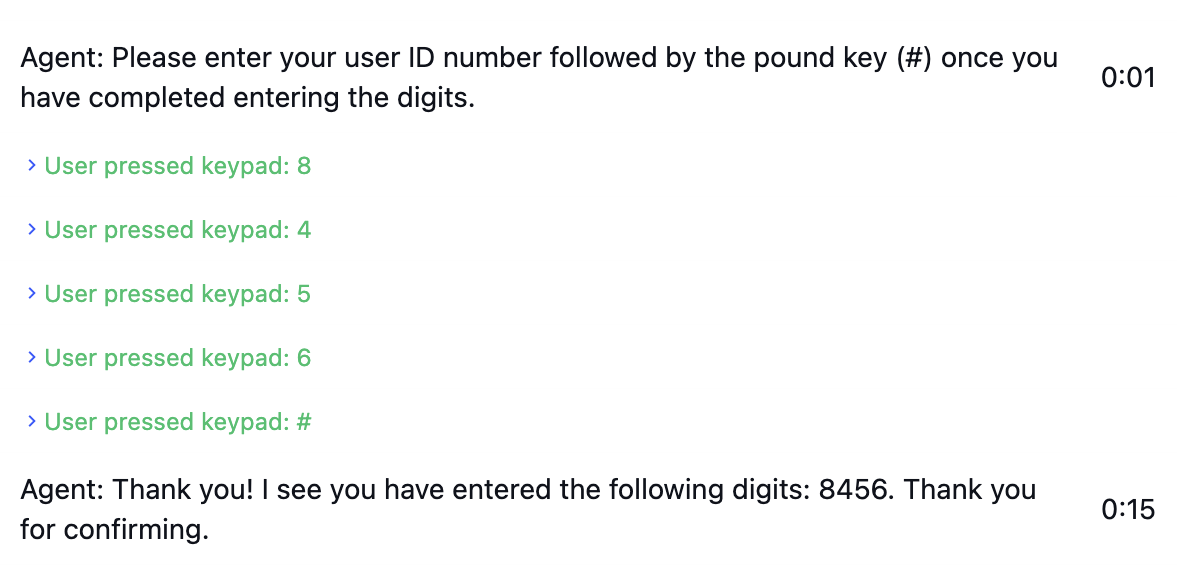
And the transcript would look like this:
Here's an example prompt:
```
Please enter your PIN number using the keypad. You can finish by pressing the pound key.
```
And the transcript would look like this:
 ## FAQ
Retell captures RFC 2833 DTMF (keypad tones sent as RTP events) by default. If digits aren't being recognized, you can confirm how they were sent by [analyzing the call's PCAP file](/reliability/debug-calls-pcap#extract-and-inspect-dtmf-events) in Wireshark.
Whichever condition is met first completes the input. For example, the agent stops collecting as soon as the digit limit is reached, the termination key is pressed, or the timeout elapses after the last digit.
Confirm the agent prompted for keypad input, then inspect the PCAP for a DTMF payload-type mismatch between the SDP and the RTP packets. See [debug SIP calls using PCAP files](/reliability/debug-calls-pcap#extract-and-inspect-dtmf-events).
## FAQ
Retell captures RFC 2833 DTMF (keypad tones sent as RTP events) by default. If digits aren't being recognized, you can confirm how they were sent by [analyzing the call's PCAP file](/reliability/debug-calls-pcap#extract-and-inspect-dtmf-events) in Wireshark.
Whichever condition is met first completes the input. For example, the agent stops collecting as soon as the digit limit is reached, the termination key is pressed, or the timeout elapses after the last digit.
Confirm the agent prompted for keypad input, then inspect the PCAP for a DTMF payload-type mismatch between the SDP and the RTP packets. See [debug SIP calls using PCAP files](/reliability/debug-calls-pcap#extract-and-inspect-dtmf-events).