> ## Documentation Index
> Fetch the complete documentation index at: https://docs.retellai.com/llms.txt
> Use this file to discover all available pages before exploring further.
# Enable SMS
> Enable SMS on Retell with Twilio numbers to send messages during calls, receive texts and MMS mid-call, and run two-way text conversations with chat agents.
Retell agents can send SMS during calls, receive texts and MMS mid-call, and hold two-way SMS conversations through [chat agents](/build/create-chat-agent). This guide shows how to enable SMS with [Retell Twilio numbers](/deploy/purchase-number) or your own Twilio number.
SMS is available for Retell Twilio numbers and custom telephony numbers that have passed A2P applications; Telnyx is not supported yet. SMS (A2P 10DLC) is limited to US phone numbers, excluding toll-free numbers — the SMS add-on is disabled for non-US numbers in the dashboard. For other custom telephony providers, check your provider's documentation on enabling SMS.
## Enable SMS capabilities
This step is a prerequisite for sending SMS from your own number during calls and for two-way SMS conversations. Receiving SMS during calls works out of the box for Retell Twilio numbers without this step.
If you only need to send SMS during calls and want to skip the A2P application, you can send from an **SMS-approved Retell number** instead. See [Option 3](#option-3-use-an-sms-approved-retell-number-no-a2p-required) for details.
### Option 1: Enable SMS for Retell Twilio numbers
Enabling SMS on a Retell Twilio number goes through three application and approval steps:
* Get approved for a business profile (free)
* Get approved for the brand based on the business profile (\$4 one-time application fee for low-volume, \$45 for standard)
* Get approved for an SMS campaign (\$15 one-time application fee)
Once approved, the SMS add-on costs \$20/month per number plus \$0.01 per SMS sent.
The entire application takes around 2-3 weeks, sometimes longer, as it's a manual review process on the telephony provider side. We notify you via email when the application is approved or rejected with the reason. If your application is stuck in pending review for over a month, reach out to support and we will help escalate.
#### Detailed steps
The following video walks through the entire application. The written steps below cover the same flow in detail.
You can reuse an existing business profile or create a new one here. Follow the instructions at [Business Profile](/build/telephony/business-profile) to get approved for a business profile.
Only one brand can be created per business profile. If the brand is rejected you can correct and resubmit it, but the brand type is fixed once the brand is registered. Changing the brand type means creating a new business profile.
Here you get to select two types of brands:
* Low-volume:
* \$4 one-time application fee
* send fewer than 6,000 message segments per day to the US (2,000 message segments per day to T-Mobile)
* Standard:
* \$45 one-time application fee
* SMS limit may fall between 6,000 and 400,000 message segments per day to the US (2,000–200,000 per day to T-Mobile)
Depending on your company's type, you might be asked to fill out additional information.
Here you fill out the use case, a description, how end users opt in, and two sample messages. This is the step most applications fail on, so follow the field-by-field templates in [SMS campaign application](/deploy/sms-campaign-application) before you submit. SMS rules are strict: if your actual traffic doesn't match the sample messages, your number or telephony subaccount might be suspended, so provide answers that match your intended use case. If you ever need to send different SMS messages, you can create a new campaign (see the FAQ below).
Registering a campaign costs a \$15 fee, non-refundable even if the campaign isn't approved. Correcting a rejected campaign and resubmitting it under the same use case is free; changing the use case registers a new campaign and is charged again (as of September 2026).
#### Rejected application FAQ
There are a few common reasons for application rejection:
* The campaign application did not provide detailed information on the use case and sample messages.
* The opt-in workflow was not explained clearly.
* The business profile or brand was not approved, due to missing or incorrect business information.
For the exact wording reviewers use and how to fix each one, see [if your campaign is rejected](/deploy/sms-campaign-application#if-your-campaign-is-rejected). Twilio also lists reasons in [Why was my A2P 10DLC campaign registration rejected?](https://help.twilio.com/articles/15778026827291-Why-Was-My-A2P-10DLC-Campaign-Registration-Rejected-).
Read the rejection reason on the phone number page and correct whatever it points at, then resubmit. Anything already approved carries over, so you only redo the step that failed.
Fix the steps in order, because a rejection cascades downward: when a business profile is rejected, its brand and every campaign under it are marked rejected too, with the profile's reason. Repair the business profile first, then the brand, then the campaign. Until the brand is approved or pending, the campaign controls stay disabled.
For the campaign itself, click **Edit** on the rejected campaign, fix the fields the reason points at, click **Save**, then click **Next** to resubmit. See [if your campaign is rejected](/deploy/sms-campaign-application#if-your-campaign-is-rejected) for what each reviewer phrase means.
No. Under **Brand Registration** on the SMS panel, click the brand to reopen it, correct the details, and save to resubmit against the same business profile. You can change the company type and, for public companies, the stock exchange and ticker.
The brand type (low-volume or standard) is fixed once the brand is registered, so it's shown read-only. Changing it does require a new business profile.
If the reason blames the business profile — a name or address that doesn't match public records, for instance — fix the business profile first. The brand inherits the business name and contact from it.
No. The fee pays for the telephony provider's manual review, which happens whatever the outcome.
You are not charged twice for fixing a rejection, though. Correcting a rejected campaign and resubmitting it under the same use case is free, and so is correcting a rejected brand while keeping the same brand type. The fee is charged again only when the correction registers a brand-new record: a different use case, a different brand type, or a correction the provider declines to accept in place (as of September 2026).
You can delete the SMS capability on the number (this will not delete your approved business profile, brand, or campaign — those can still be reused), and create a new SMS application with a new campaign while reusing the business profile and brand.
### Option 2: Bring your own Twilio number
If you already have a Twilio number with SMS capabilities enabled, you can integrate it with Retell by following these steps:
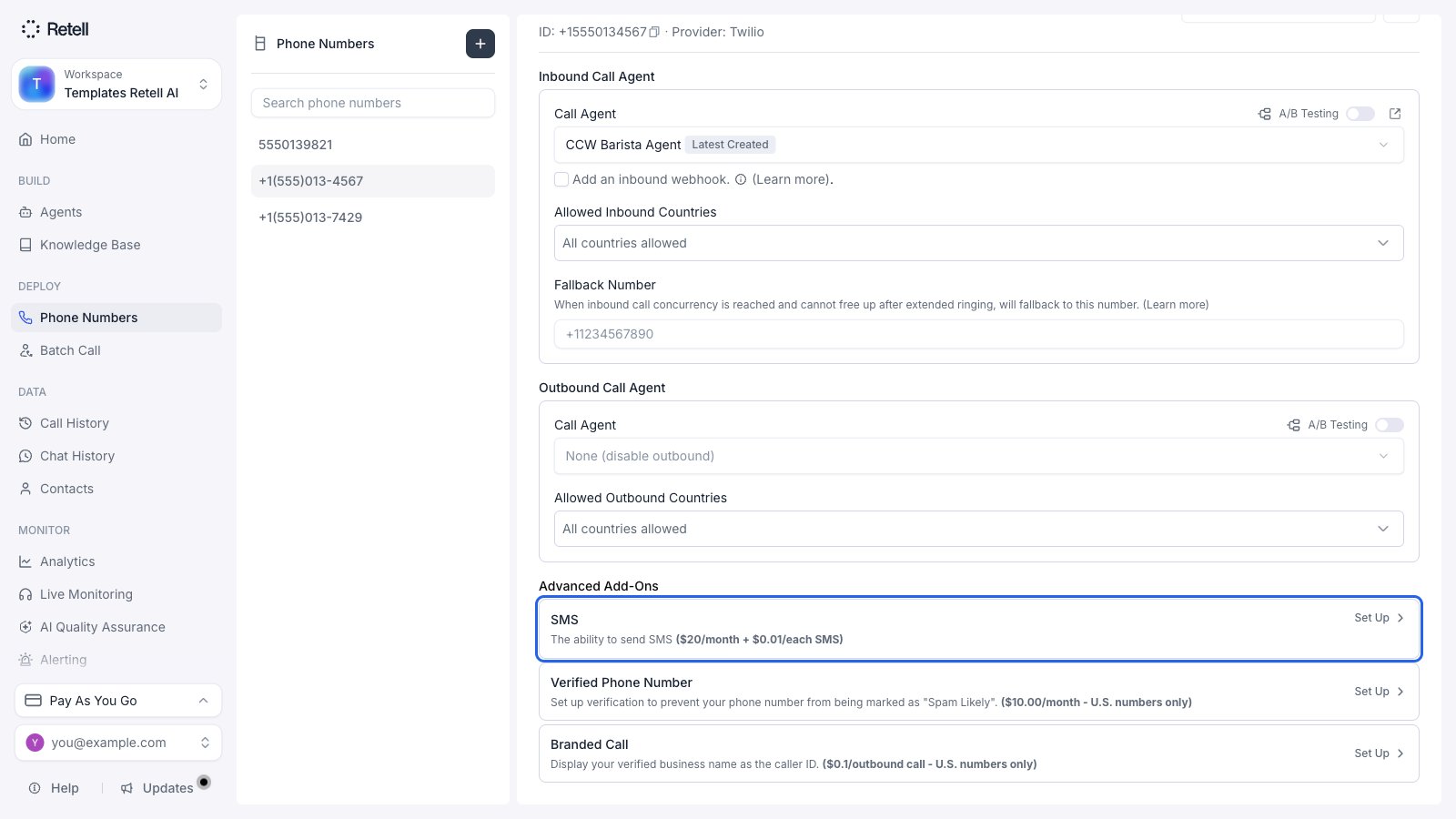
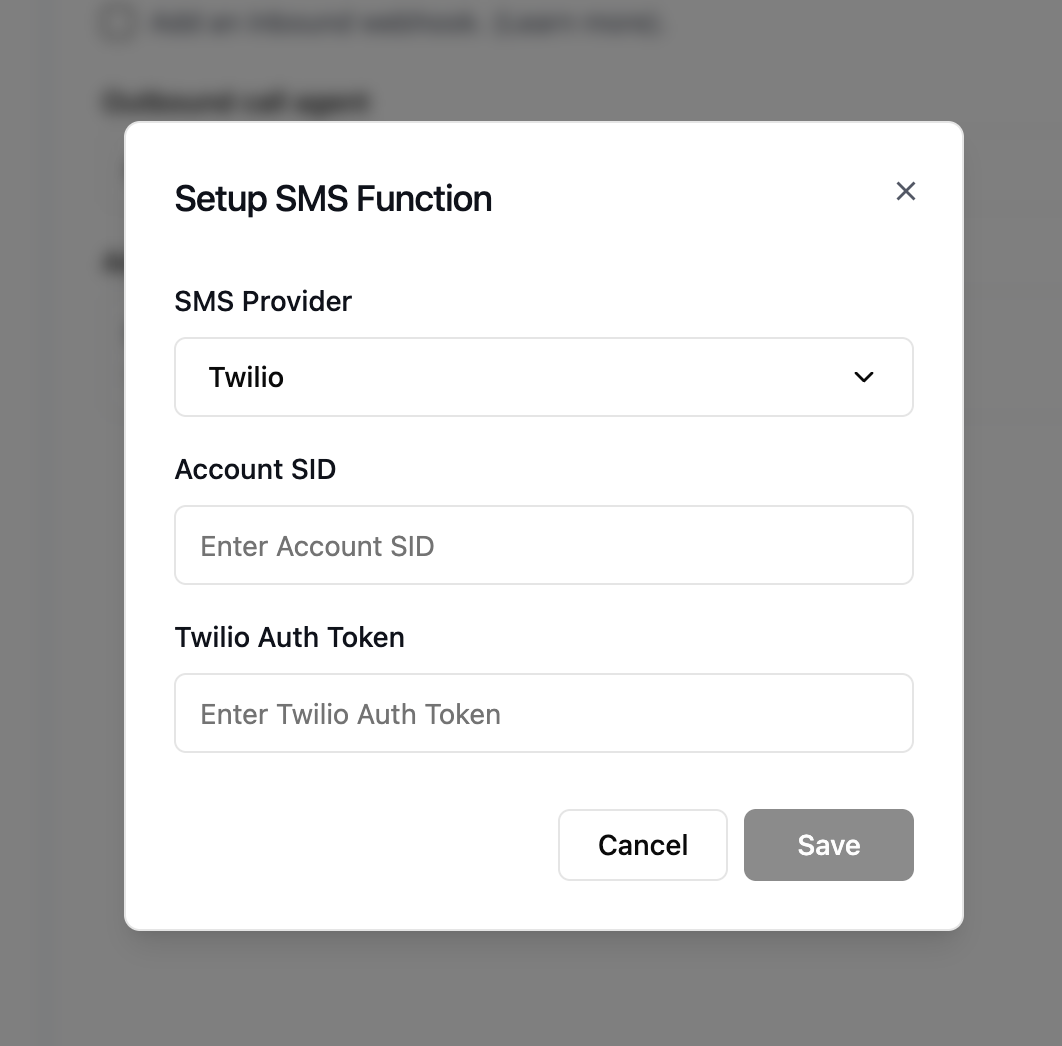
Navigate to your phone number settings in the Retell dashboard and click **Setup SMS Function** under **Advanced Add-Ons**.
Enter the following information from your Twilio account:
* **Account SID**: your unique Twilio account identifier
* **Twilio Auth Token**: your Twilio authentication token for API access
You can find these credentials in your Twilio Console under Account Info.
Once your credentials are verified, your Twilio number is integrated with Retell's SMS capabilities: sending SMS during calls and two-way SMS conversations.
If you use two-way SMS, also update your Twilio Messaging Service so incoming messages are handled by the number's own webhook (the `useInboundWebhookOnNumber` setting) — otherwise inbound texts won't reach Retell.
Make sure your Twilio number already has SMS capabilities enabled and is compliant with SMS regulations before integration. For more information about A2P 10DLC compliance, see [Twilio's A2P 10DLC documentation](https://www.twilio.com/docs/proxy/flex-a2p-10dlc).
### Option 3: Use an SMS-approved Retell number (no A2P required)
If you only need to send SMS during active phone calls and want to skip the A2P application entirely, you can send from Retell's **pool of SMS-approved numbers**. No setup or approval steps are needed — select this option when configuring your SMS node or tool, and you can start sending right away. A number from the pool is automatically selected for each call, and all SMS sent within the same call use the same number.
When sending from an SMS-approved Retell number, the message content is a **preset template provided by Retell** — you cannot customize the text or use a prompt. This option is for in-call SMS only and does not support two-way SMS conversations.
## Send SMS during call
You can configure agents to send SMS messages to the user during an active phone call. Refer to the following docs for setup details:
* For Conversation Flow: [SMS Node](/build/conversation-flow/sms-node).
* For Single/Multi Prompt: [Send SMS](/build/single-multi-prompt/send-sms).
## Receive SMS during call
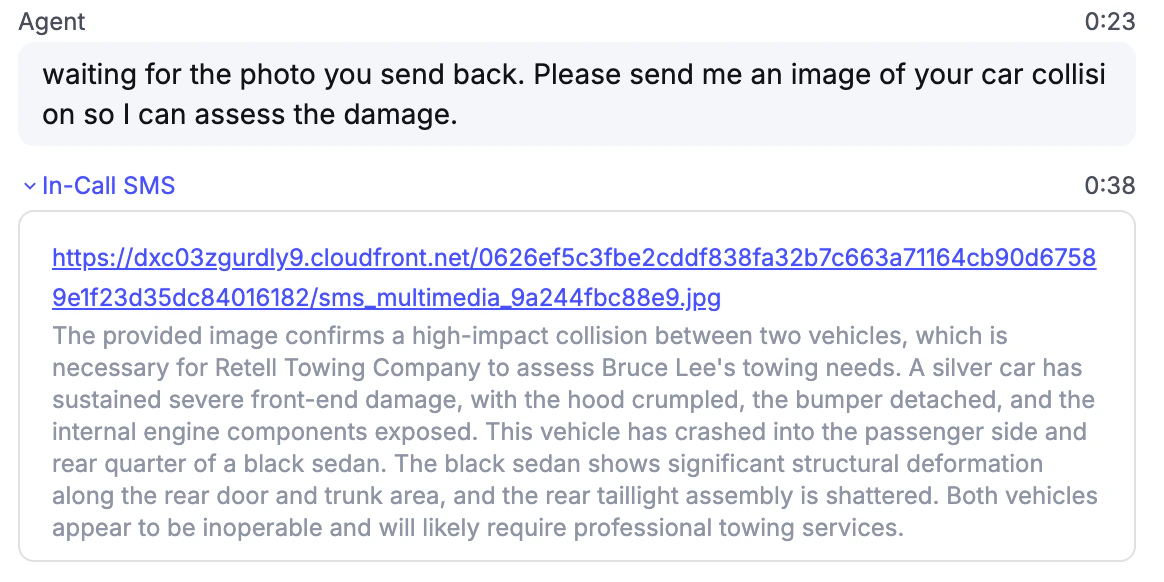
Agents can receive and understand SMS messages during an active phone call — even if the agent has not sent any SMS. This lets users send supplementary information mid-conversation, such as a photo of a document, a screenshot, or a reference number.
For Retell Twilio numbers, this works out of the box without enabling SMS. For custom telephony numbers that have passed A2P applications, this is also supported.
**Multimedia (MMS)** is supported in addition to plain text: users can send images, audio, and video as carrier-supported MMS attachments. Whatever is delivered to Retell as part of the message is incorporated into the ongoing voice conversation so the agent can respond with that context.
## Set up two-way SMS conversation
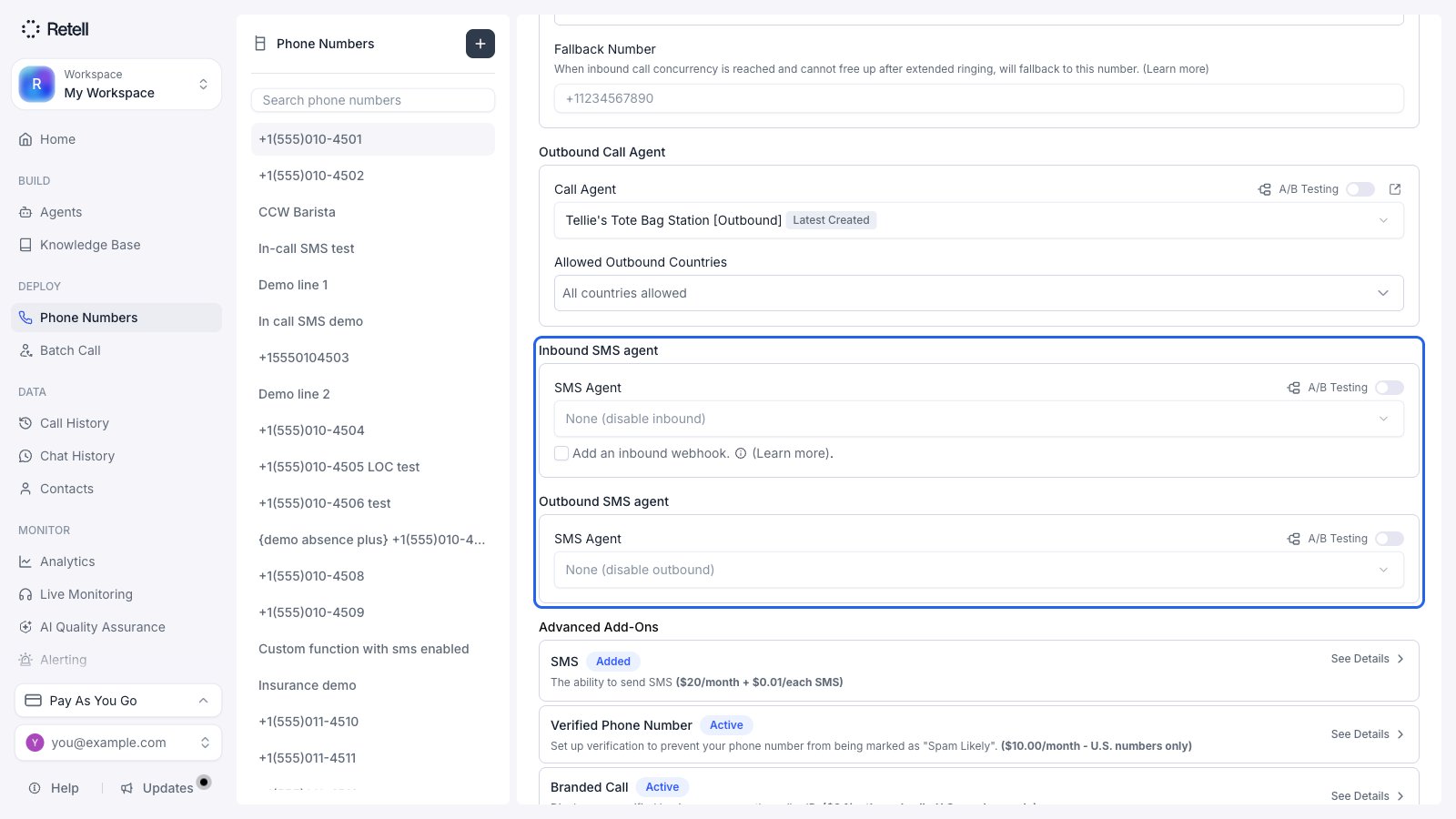
Once SMS capability is enabled for the number, you can set up a two-way SMS conversation by attaching [chat agents](/build/create-chat-agent) to the number, so it can receive SMS and reply to the user.
Once the chat agent is attached, inbound SMS starts working immediately. Use the inbound webhook to filter and add context to inbound SMS — read more at [Inbound Webhook](/features/inbound-call-webhook).
For outbound SMS, click **Make an outbound SMS** in the dashboard, or call the [Create Outbound SMS API](/api-references/create-sms-chat) to send it programmatically.
## FAQ
No. Receiving SMS and MMS during calls works out of the box for Retell Twilio numbers, with no A2P application. The A2P application is required to send SMS from your own number and to run two-way SMS conversations.
Not yet. SMS is available for Retell Twilio numbers and custom telephony numbers that have passed A2P applications.
No. SMS (A2P 10DLC) is limited to US phone numbers and excludes toll-free numbers, so the SMS add-on is disabled for non-US and toll-free numbers.
No. If you skip A2P and send from an SMS-approved Retell number, the content is a preset template provided by Retell that you can't customize, and it supports in-call SMS only. Custom message content requires enabling SMS on your own number.
Around 2-3 weeks, sometimes longer, since it's a manual review on the telephony provider side. You're notified by email when it's approved or rejected. If it's stuck in pending review for over a month, reach out to support to escalate.
 The entire application takes around 2-3 weeks, sometimes longer, as it's a manual review process on the telephony provider side. We notify you via email when the application is approved or rejected with the reason. If your application is stuck in pending review for over a month, reach out to support and we will help escalate.
#### Detailed steps
The following video walks through the entire application. The written steps below cover the same flow in detail.
The entire application takes around 2-3 weeks, sometimes longer, as it's a manual review process on the telephony provider side. We notify you via email when the application is approved or rejected with the reason. If your application is stuck in pending review for over a month, reach out to support and we will help escalate.
#### Detailed steps
The following video walks through the entire application. The written steps below cover the same flow in detail.
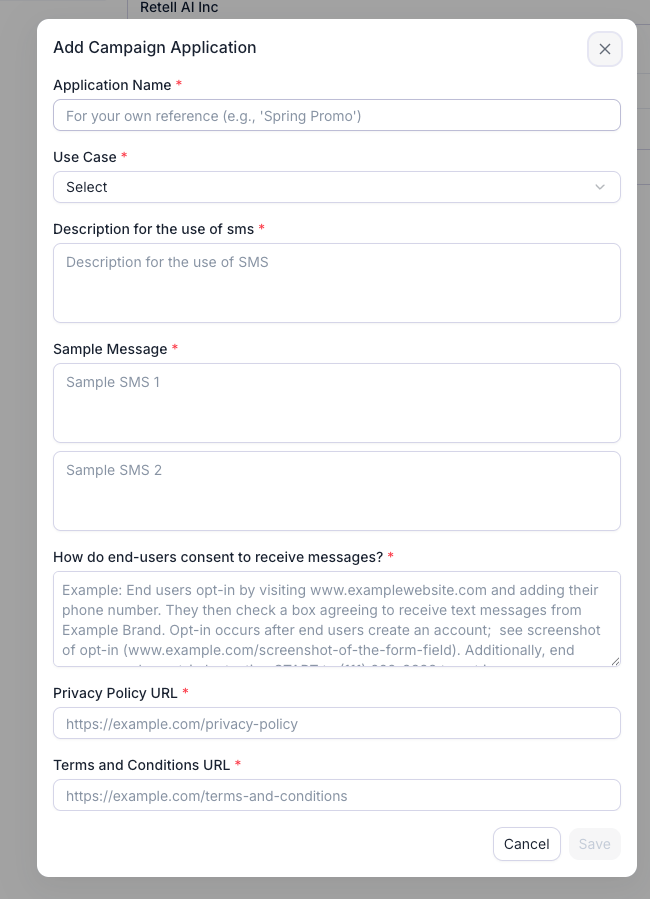 Here you fill out the use case, a description, how end users opt in, and two sample messages. This is the step most applications fail on, so follow the field-by-field templates in [SMS campaign application](/deploy/sms-campaign-application) before you submit. SMS rules are strict: if your actual traffic doesn't match the sample messages, your number or telephony subaccount might be suspended, so provide answers that match your intended use case. If you ever need to send different SMS messages, you can create a new campaign (see the FAQ below).
Registering a campaign costs a \$15 fee, non-refundable even if the campaign isn't approved. Correcting a rejected campaign and resubmitting it under the same use case is free; changing the use case registers a new campaign and is charged again (as of September 2026).
Here you fill out the use case, a description, how end users opt in, and two sample messages. This is the step most applications fail on, so follow the field-by-field templates in [SMS campaign application](/deploy/sms-campaign-application) before you submit. SMS rules are strict: if your actual traffic doesn't match the sample messages, your number or telephony subaccount might be suspended, so provide answers that match your intended use case. If you ever need to send different SMS messages, you can create a new campaign (see the FAQ below).
Registering a campaign costs a \$15 fee, non-refundable even if the campaign isn't approved. Correcting a rejected campaign and resubmitting it under the same use case is free; changing the use case registers a new campaign and is charged again (as of September 2026).
 ## Set up two-way SMS conversation
Once SMS capability is enabled for the number, you can set up a two-way SMS conversation by attaching [chat agents](/build/create-chat-agent) to the number, so it can receive SMS and reply to the user.
## Set up two-way SMS conversation
Once SMS capability is enabled for the number, you can set up a two-way SMS conversation by attaching [chat agents](/build/create-chat-agent) to the number, so it can receive SMS and reply to the user.
 Once the chat agent is attached, inbound SMS starts working immediately. Use the inbound webhook to filter and add context to inbound SMS — read more at [Inbound Webhook](/features/inbound-call-webhook).
For outbound SMS, click **Make an outbound SMS** in the dashboard, or call the [Create Outbound SMS API](/api-references/create-sms-chat) to send it programmatically.
## FAQ
Once the chat agent is attached, inbound SMS starts working immediately. Use the inbound webhook to filter and add context to inbound SMS — read more at [Inbound Webhook](/features/inbound-call-webhook).
For outbound SMS, click **Make an outbound SMS** in the dashboard, or call the [Create Outbound SMS API](/api-references/create-sms-chat) to send it programmatically.
## FAQ