> ## Documentation Index
> Fetch the complete documentation index at: https://docs.retellai.com/llms.txt
> Use this file to discover all available pages before exploring further.
# Build your first phone agent in 15 minutes
> Build your first Retell AI phone agent in 15 minutes: create an account, pick a template, test in the dashboard, deploy to a phone number, and make a call.
**Retell** is a platform for building, testing, and deploying **AI phone agents** that hold natural conversations over the phone.
1. Visit the [Retell Dashboard](https://dashboard.retellai.com)
2. Sign up for a new account
New accounts start with \$10 in free trial credits, no payment method required. You'll only need to add one if you want to purchase a phone number.
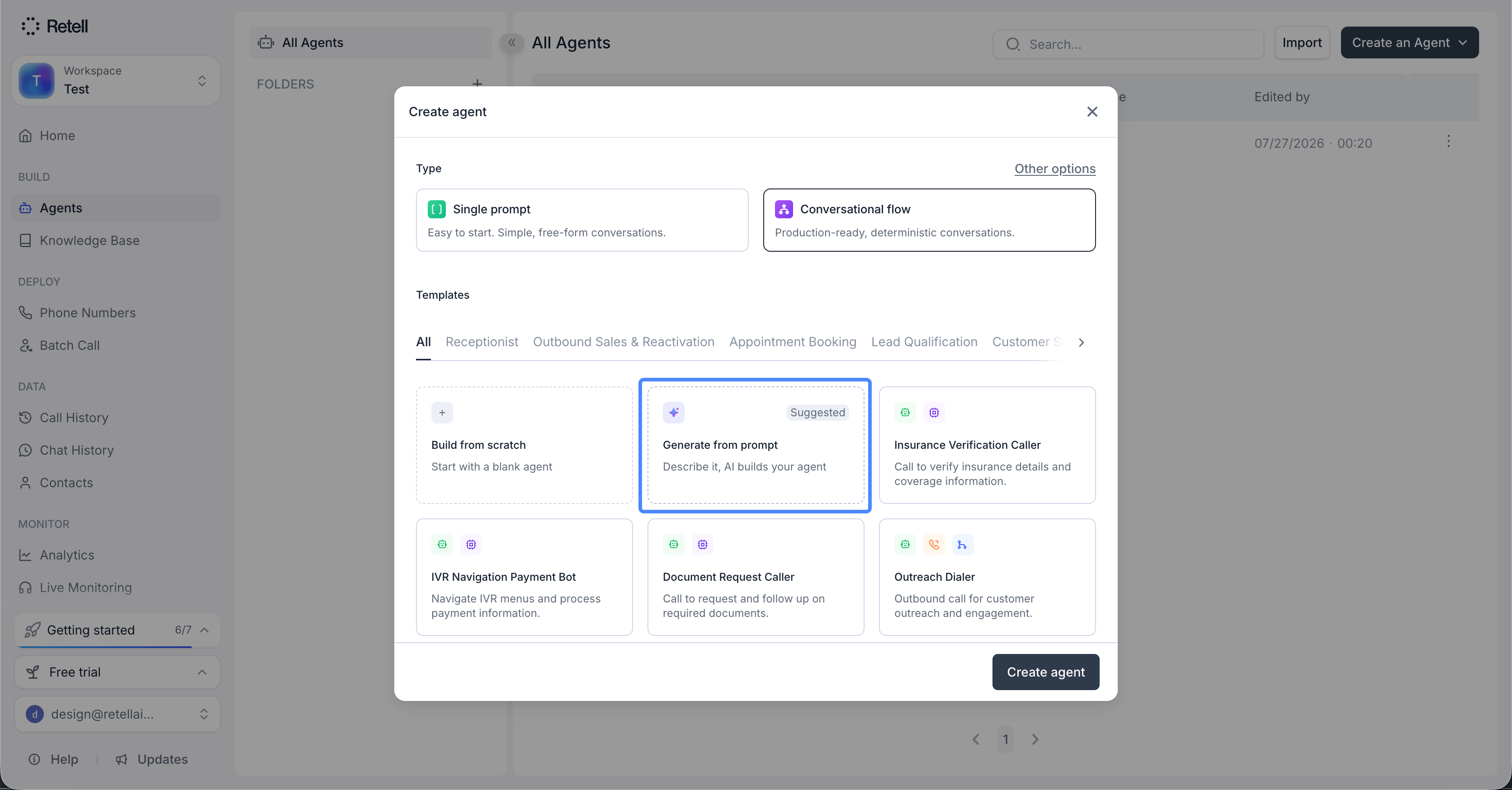
1. Navigate to the "Agents" tab
2. Click "Create an agent"
3. Pick the agent type: **Single prompt** (easy to start, simple free-form conversations) or **Conversational flow** (production-ready, deterministic conversations)
4. Choose how to start: click **Build from scratch** to build everything yourself, pick a ready-made template like Receptionist or Insurance Verification Caller, or click **Generate from prompt** (marked Suggested) to let [Conductor](/conductor/create-agent) draft an agent from a plain-English description of your use case
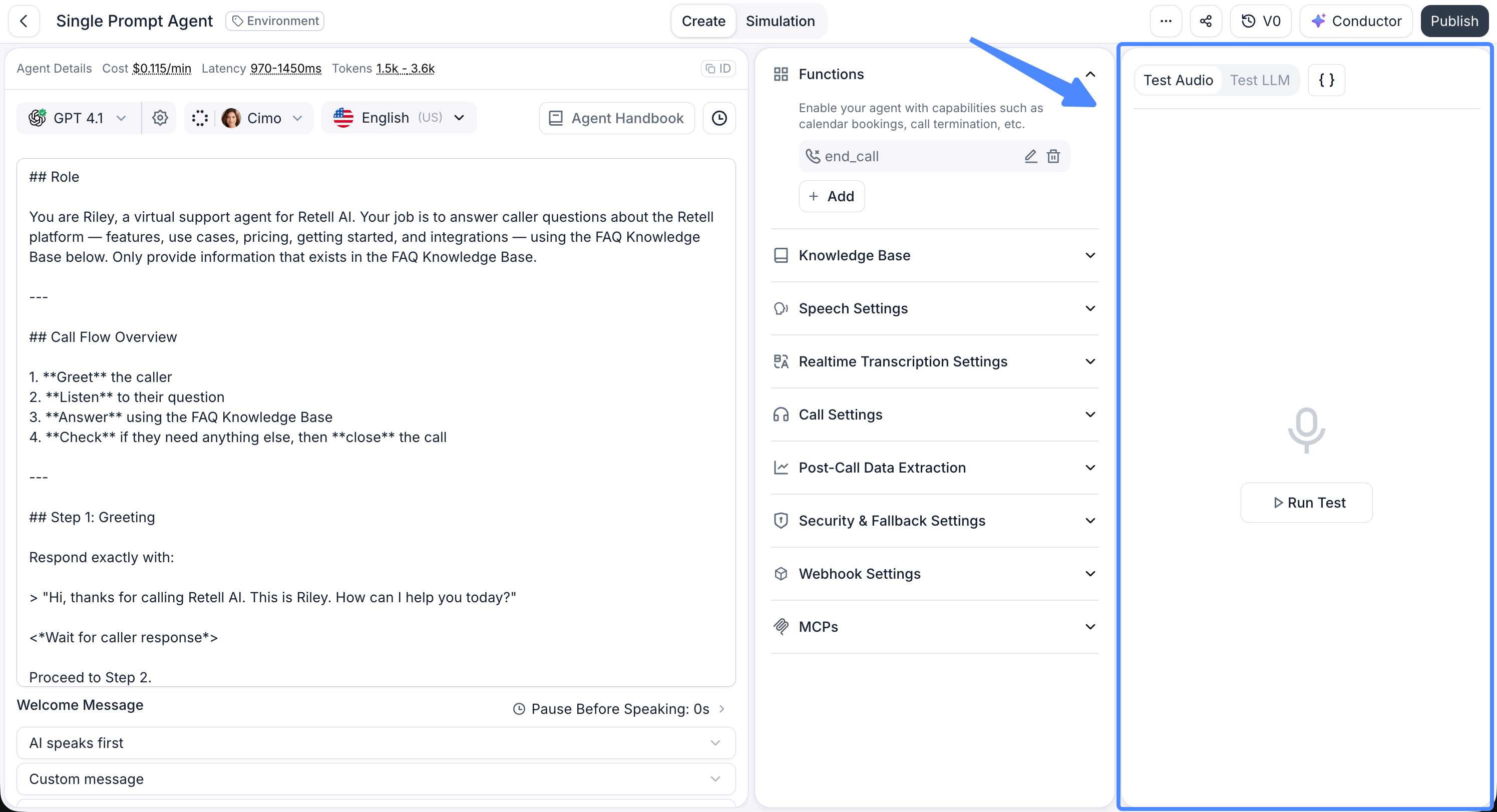
 1. Click the "Test" button to start a web call with your agent
2. Allow microphone access when your browser prompts for it, then talk to your agent like a real caller
This step is free and doesn't need a phone number or payment method. You can test a draft agent this way as many times as you want before publishing it.
1. Click the "Test" button to start a web call with your agent
2. Allow microphone access when your browser prompts for it, then talk to your agent like a real caller
This step is free and doesn't need a phone number or payment method. You can test a draft agent this way as many times as you want before publishing it.
 1. Go to the "Phone Numbers" tab
2. Click "Buy New Number"
3. If you don't have a payment method on file yet, add one: click "Add Payment Method" right on the "New Number" page, or go to the "Billing" tab and click "Manage Payment Methods" to add one through Stripe
4. (Optional) Enter the area code you want to buy the number for
5. Purchase your number
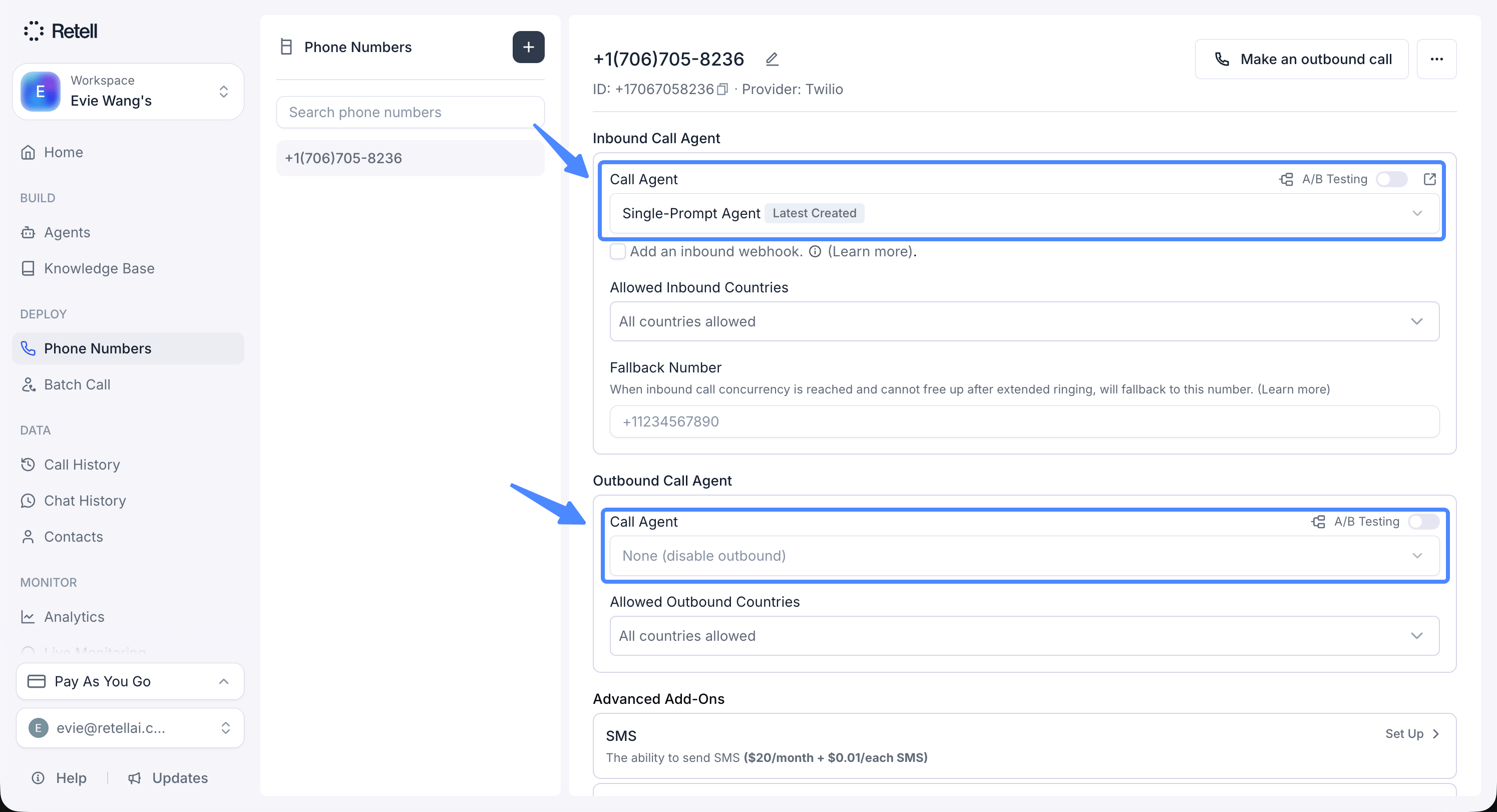
6. Assign your agent to the number in the configuration settings
Retell-managed numbers are US and Canada only: \$2 per month for normal phone numbers, \$5 per month for toll-free phone numbers. If you need a number from another country or want to bring your own telephony provider, see [custom telephony](/deploy/custom-telephony) instead.
1. Go to the "Phone Numbers" tab
2. Click "Buy New Number"
3. If you don't have a payment method on file yet, add one: click "Add Payment Method" right on the "New Number" page, or go to the "Billing" tab and click "Manage Payment Methods" to add one through Stripe
4. (Optional) Enter the area code you want to buy the number for
5. Purchase your number
6. Assign your agent to the number in the configuration settings
Retell-managed numbers are US and Canada only: \$2 per month for normal phone numbers, \$5 per month for toll-free phone numbers. If you need a number from another country or want to bring your own telephony provider, see [custom telephony](/deploy/custom-telephony) instead.
 1. Incoming Calls:
* Dial your purchased number
2. Outbound Calls:
* Click "Make an outbound call"
* Enter the phone number including the country code (e.g., `+12137774445`)
Congratulations! Your agent is now live. It can:
* Receive incoming calls
* Make outbound calls
* Handle natural conversations 24/7
## FAQ
Check your browser's site permissions and allow microphone access for the dashboard, then click "Test" again. If you dismissed the permission prompt, most browsers require you to re-enable it from the address bar's site settings rather than retriggering the prompt automatically.
No. Web call testing (step 3) works on a draft, unpublished agent with no payment method or phone number required. You only need a number once you want to make or receive real phone calls.
Not as a Retell-managed number. Connect your own provider instead. See [custom telephony](/deploy/custom-telephony).
Double-check the card details and try again, or add a different payment method from the "Billing" tab. See [add payment methods](/accounts/add-payment) for more detail.
## Next steps
Now that your agent works, keep going:
See everything you can configure, prompts, voice, knowledge, and more
Integrate APIs and external services into your agent
Track call metrics and analyze agent performance
Automatically extract structured data like call outcome and sentiment from every call
### Follow us on YouTube
Subscribe for tutorials, feature walkthroughs, and other educational content. See more in the [video hub](/videos/introduction).
1. Incoming Calls:
* Dial your purchased number
2. Outbound Calls:
* Click "Make an outbound call"
* Enter the phone number including the country code (e.g., `+12137774445`)
Congratulations! Your agent is now live. It can:
* Receive incoming calls
* Make outbound calls
* Handle natural conversations 24/7
## FAQ
Check your browser's site permissions and allow microphone access for the dashboard, then click "Test" again. If you dismissed the permission prompt, most browsers require you to re-enable it from the address bar's site settings rather than retriggering the prompt automatically.
No. Web call testing (step 3) works on a draft, unpublished agent with no payment method or phone number required. You only need a number once you want to make or receive real phone calls.
Not as a Retell-managed number. Connect your own provider instead. See [custom telephony](/deploy/custom-telephony).
Double-check the card details and try again, or add a different payment method from the "Billing" tab. See [add payment methods](/accounts/add-payment) for more detail.
## Next steps
Now that your agent works, keep going:
See everything you can configure, prompts, voice, knowledge, and more
Integrate APIs and external services into your agent
Track call metrics and analyze agent performance
Automatically extract structured data like call outcome and sentiment from every call
### Follow us on YouTube
Subscribe for tutorials, feature walkthroughs, and other educational content. See more in the [video hub](/videos/introduction).