Add a Code tool to a single- or multi-prompt Retell agent to run JavaScript, read dynamic variables and metadata, call HTTP APIs, and store results.
Code Tool lets a single- or multi-prompt agent run JavaScript in Retell’s
sandbox. The LLM decides when to call the tool from its name, description, and
conversation context.For example, a lending agent can call a Code Tool to calculate a repayment
amount from values already stored in dynamic variables, then use the returned
amount in its next response.If you use a conversation flow agent, see Code node.
LLM-supplied parameters, dynamic variables, and request data
Best for
Formatting, calculations, and low-risk HTTP lookups
Authenticated integrations and production workflows
Maximum code size
20,000 characters
Not applicable
Code Tool doesn’t accept LLM-supplied parameters. The sandbox receives only the
current dv and metadata objects. If the LLM must compose arguments when it
calls the tool, use a custom function.
Use Code Tool only for logic that can run without secrets. Dynamic variables
and metadata are stored in plaintext with the call or chat record. For
authentication, secret management, internal systems, or production writes, use
a custom function hosted on your backend.
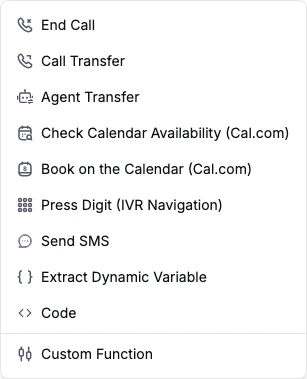
In the agent’s Functions section, select + Add, then select
Code.
Code in the function-type menu.
2
Set the name and description
Use a unique name with 1–64 letters, numbers, underscores, or dashes. Spaces
aren’t allowed. The description can contain up to 1,024 characters and
should tell the LLM exactly when to call the tool.For example:
Name:calculate_daily_repayment
Description:Calculate the daily repayment amount after fin_amount, tenure_days, and interest_rate are available as dynamic variables.
3
Write JavaScript
Read input values from dv or metadata and return a JSON-serializable
value. Retell serializes the return value to JSON, sends it to the LLM as
the tool result, and extracts any response variables from it (next step).
Under Store Fields as Variables, map a dynamic-variable name to a path
in the returned value. For the example above, map daily_repayment to
daily_repayment.See Store response variables for nested and
array paths.
5
Configure execution feedback
Under During Execution Feedback, turn on Talk while waiting to use a
generated prompt or static sentence, or turn on Play typing sound.
Talk After Action Completed is on by default so the LLM responds after
the result arrives.
6
Update the agent prompt
Tell the LLM when the required dynamic variables are ready and when to call
the tool.
After fin_amount, tenure_days, and interest_rate are available as dynamicvariables, call calculate_daily_repayment before quoting a repayment amount.
7
Test the code
Use Dynamic Variables in the editor to add test values, then select
Run Code. The result and any console.log() output appear below the
editor.Test values stay in the dashboard and don’t change the live agent. The
dashboard test doesn’t populate metadata, so metadata-dependent code must
handle an empty object during testing.
Use dv.user_number, not {{user_number}}, inside JavaScript. Runtime values
such as call_id, chat_id, session_type, direction, user_number, and
agent_number are available when they apply to the current session.
Dynamic variables are available through dv inside JavaScript. {{...}}
template substitution isn’t available inside code.
Code Tool has no parameter schema. If the tool needs values mentioned by the
caller, extract them into dynamic variables first with an
Extract Dynamic Variable tool or return
them as response variables from an earlier tool. Because the LLM selects tools,
it can skip a separate extraction tool. Use a custom function when arguments must be composed
at call time, or a conversation flow when the extraction and calculation must
run in a fixed sequence.
fetch() supports HTTP and HTTPS URLs, request methods, string-valued headers,
and request bodies. The returned response supports status, ok,
statusText, url, headers.get(), text(), and json().
The sandbox blocks non-HTTP protocols and selected local, private, and platform
addresses. It doesn’t provide the complete browser Fetch API.Code Tool fetch() requests originate from 35.166.138.221. If your public
API restricts inbound traffic by IP address, allowlist 35.166.138.221/32.
The sandbox provides common JavaScript built-ins such as Array, Date,
JSON, Map, Math, Promise, RegExp, and Set. Node.js modules, browser
DOM APIs, require, import, and Intl aren’t available.
Stored values are strings. Objects and arrays are stored as JSON strings. If a
path doesn’t exist or resolves to null, Retell skips that variable without
failing the execution.Response-variable extraction uses the full return value, even when the result
sent to the agent is capped at 15,000 characters.
Speaks one generated prompt or static sentence when the tool starts.
Play typing sound
Off
Plays a typing sound while the tool runs.
Talk After Action Completed
On
Calls the LLM after the result arrives so the agent can respond. Turn it off to finish silently.
If several tools run in sequence, enable Talk while waiting on only the tool
that should speak. Otherwise, the caller can hear multiple waiting messages.
No. Code Tool doesn’t expose a parameter schema and receives only dv and metadata. Use a custom function when the LLM must fill arguments at call time. If you chain an Extract Dynamic Variable tool before Code Tool, the LLM can still skip that first tool; use a conversation flow when the sequence must be deterministic.
Why does the agent say the waiting message twice?
Each tool with Talk while waiting enabled can speak its own message. If an extraction tool and Code Tool run in sequence, enable the setting on only one of them or give them distinct messages.
Can I use npm packages or browser APIs?
No. The sandbox doesn’t provide require, import, Node.js modules, browser DOM APIs, or Intl. Use the available JavaScript built-ins and fetch().
What happens if the code times out or throws an error?
Retell marks the execution as failed, sends the error to the LLM, doesn’t extract response variables, and doesn’t retry automatically. Use try/catch for expected errors and return a structured fallback such as { "ok": false, "error": "lookup failed" }.
Can I use async/await?
Yes. Top-level await is supported, including for fetch() calls.
Can I write dynamic variables from inside the code?
Not by assigning to dv. The sandbox receives a copy of dv, so changes you make to it inside the code don’t persist. To write a value back for later turns, return it and map it under Store Fields as Variables.
Is there a limit on the result size?
Retell sends up to 15,000 characters to the agent by default. Response-variable extraction uses the full return value before that result is capped.
Was this page helpful?
⌘I
Assistant
Responses are generated using AI and may contain mistakes.