

This tool only works for phone numbers that have SMS enabled, or when using an SMS-approved Retell number. Read more about enabling SMS.
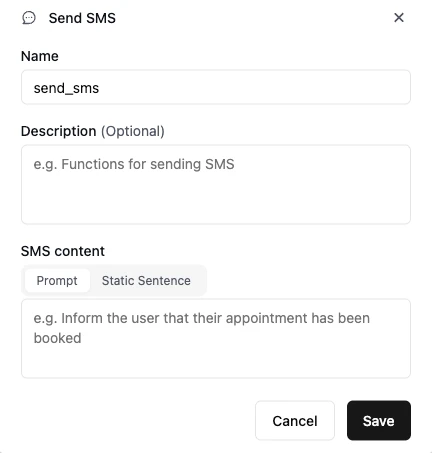
Choose where to send from

Send from options for in-call SMS (Single/Multi Prompt)
- SMS-approved Retell number: Send from Retell’s pool of numbers that are already approved for SMS. This bypasses the A2P application process entirely. The message content is a preset template provided by Retell — you cannot customize the text or use a prompt.
- Agent’s associated number: Send from the phone number bound to the agent. This requires your number to have SMS enabled through the A2P application, and the agent should collect SMS consent before sending.
Configure SMS content
- When sending from the agent’s associated number: You can write a prompt to let the agent infer the SMS content, or use static SMS content. Dynamic variables are supported for static SMS content.
- When sending from an SMS-approved Retell number: The message is a preset template provided by Retell. You cannot edit the content.
Configure SMS destination
By default, the SMS is sent to the caller’s number. You can also choose to send to a different number — either a static number or a dynamic variable (e.g.{{customer_phone}}).